
GoG ePay Services Portal 2026 – How to Register, Login & Download Your EPayslip?
Still waiting in long queues to collect your payslip? The Government of Ghana has now introduced the New GOG EPayslip portal called GoG ePay Services , which allows public sector employees to access their payslips online easily and more securely.The Ghana government payslip portal 2026, managed by the Controller and Accountant-General’s Department (CAGD), replaces the old GOGPayslip system. With this new digital payroll platform, employees can register, login, and download their monthly payslips anytime without visiting their HR office.
The New CAGD payslip website provides a fast, secure, and paperless way for government workers to manage their salary information. After completing the GoG ePay Services registration, employees can view and download payslips, check earnings and deductions, access GRA and SSF reports, generate mandate forms, and manage payroll-related services online. This upgraded cagd EPayslip 2026 system also improves security by requiring Ghana Card verification and OTP confirmation, ensuring that only authorized employees can access their payslip information safely.

What is GoG ePay Services?
GoG ePay Services is the new official online payslip portal introduced by the Controller and Accountant-General’s Department (CAGD) to replace the old GoGPayslip portal. It allows Ghana government employees to securely access, view, and download their monthly EPayslip anytime without visiting their HR office. The new system uses Ghana Card verification and OTP for better security and makes it easier for public sector workers to manage their salary information online.
Requirements for Registration
To be able to use this payroll system you need to register on the GoGEPayslip portal. For registration, you have to fulfill the following requirements:
Step-by-Step Registration Process
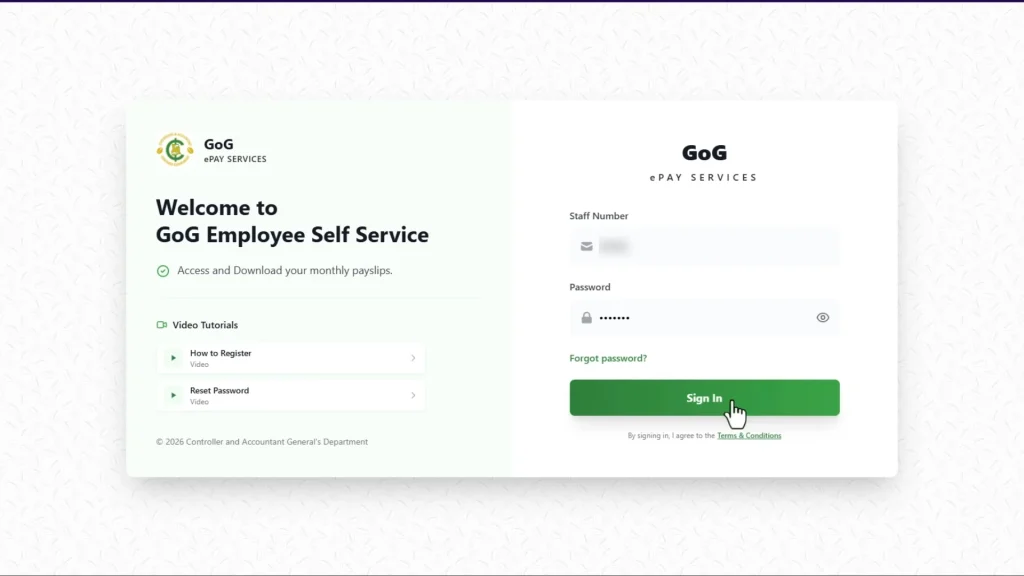
Step 1: Go to Official Website
Open your browser and visit: GoG ePay Services Portal
This platform is the new updated gogpayslip portal introduced by the Government of Ghana. Government employees can use it to check EPayslips and manage their payslip accounts.
Step 2: Forgot Password
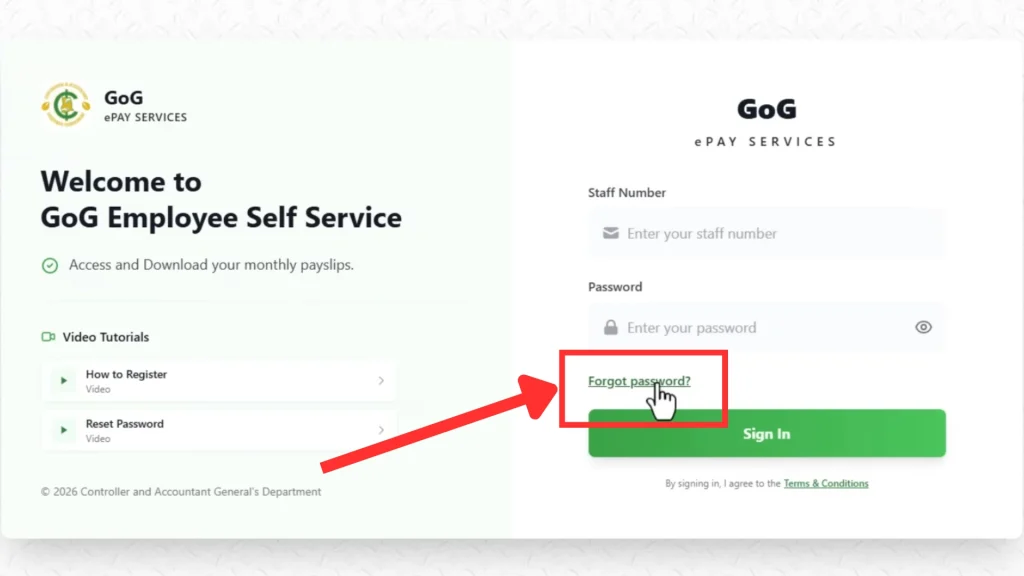
Click on the “Forgot Password” button to start the registration process.
On the gogepayservices portal, the “Forgot Password” button is also used to register your epayslip account.
Step 3: Employee Number
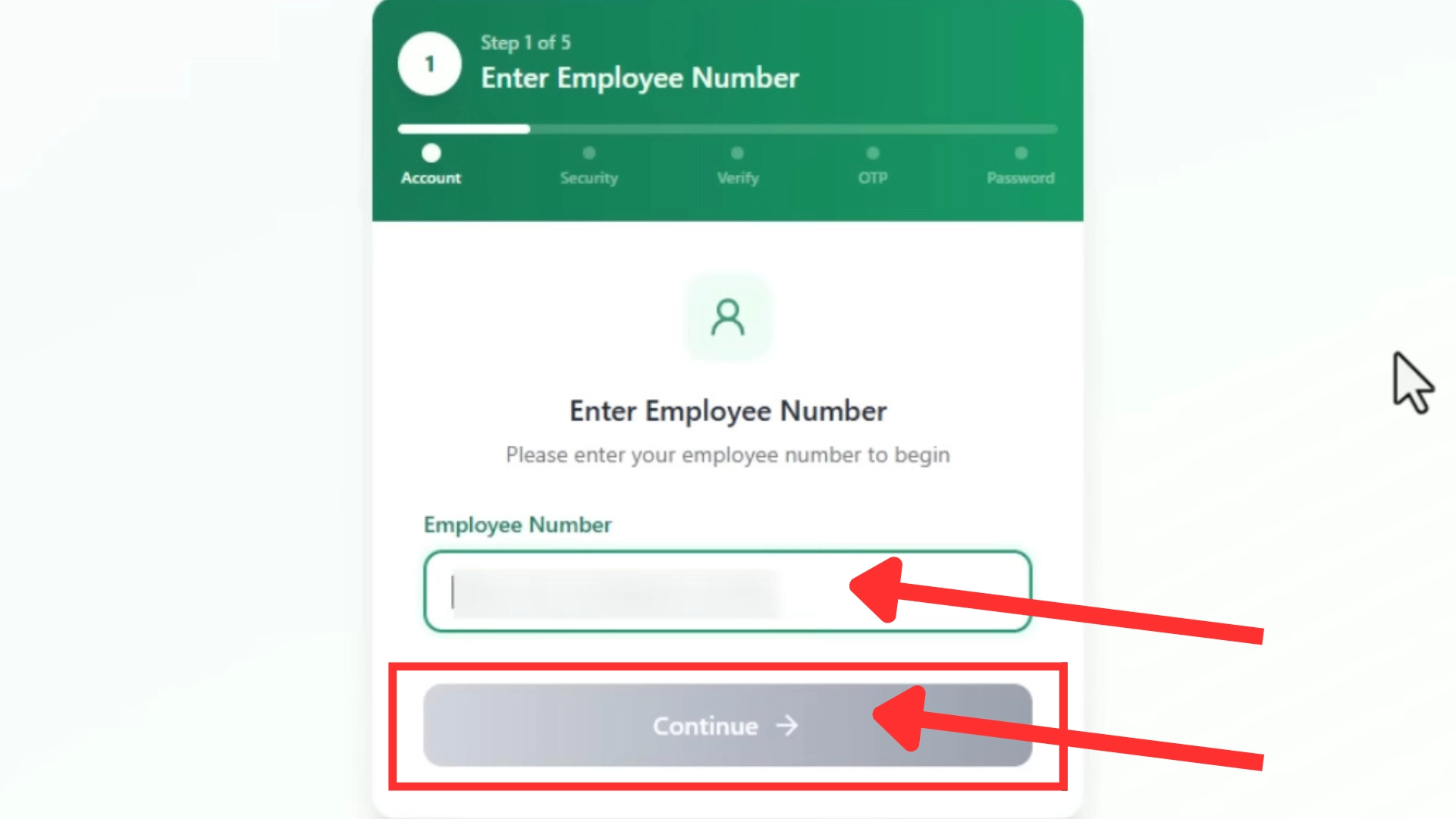
Enter your Staff ID or Employee Number correctly and click the “Continue” button.
Make sure to enter the correct employee number.
Step 4: Ghana Card Number
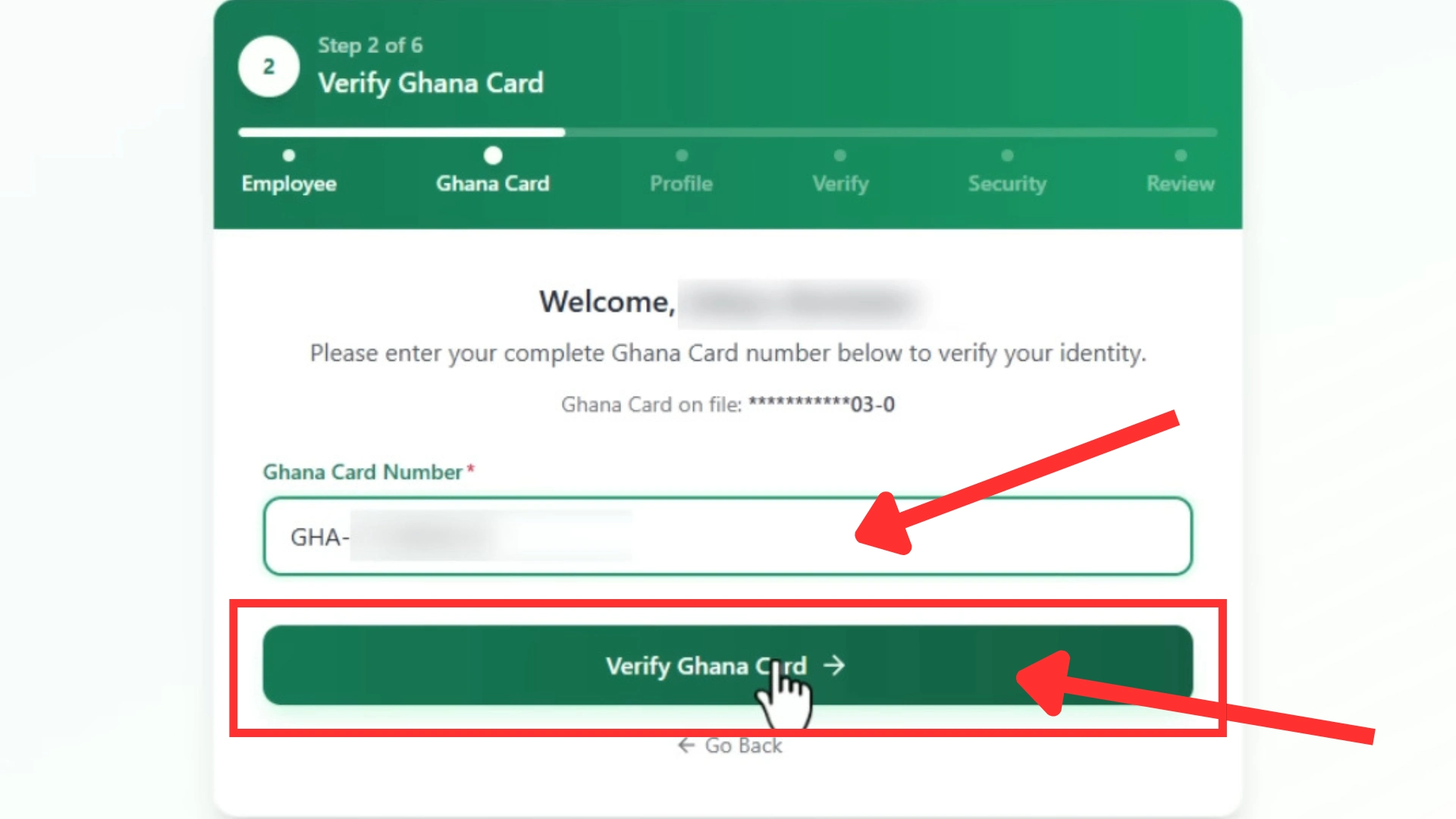
Now enter your Ghana Card (NIA) number carefully and click the “Verify Ghana Card”.
If your details match the CAGD database, your information will automatically appear on the screen.
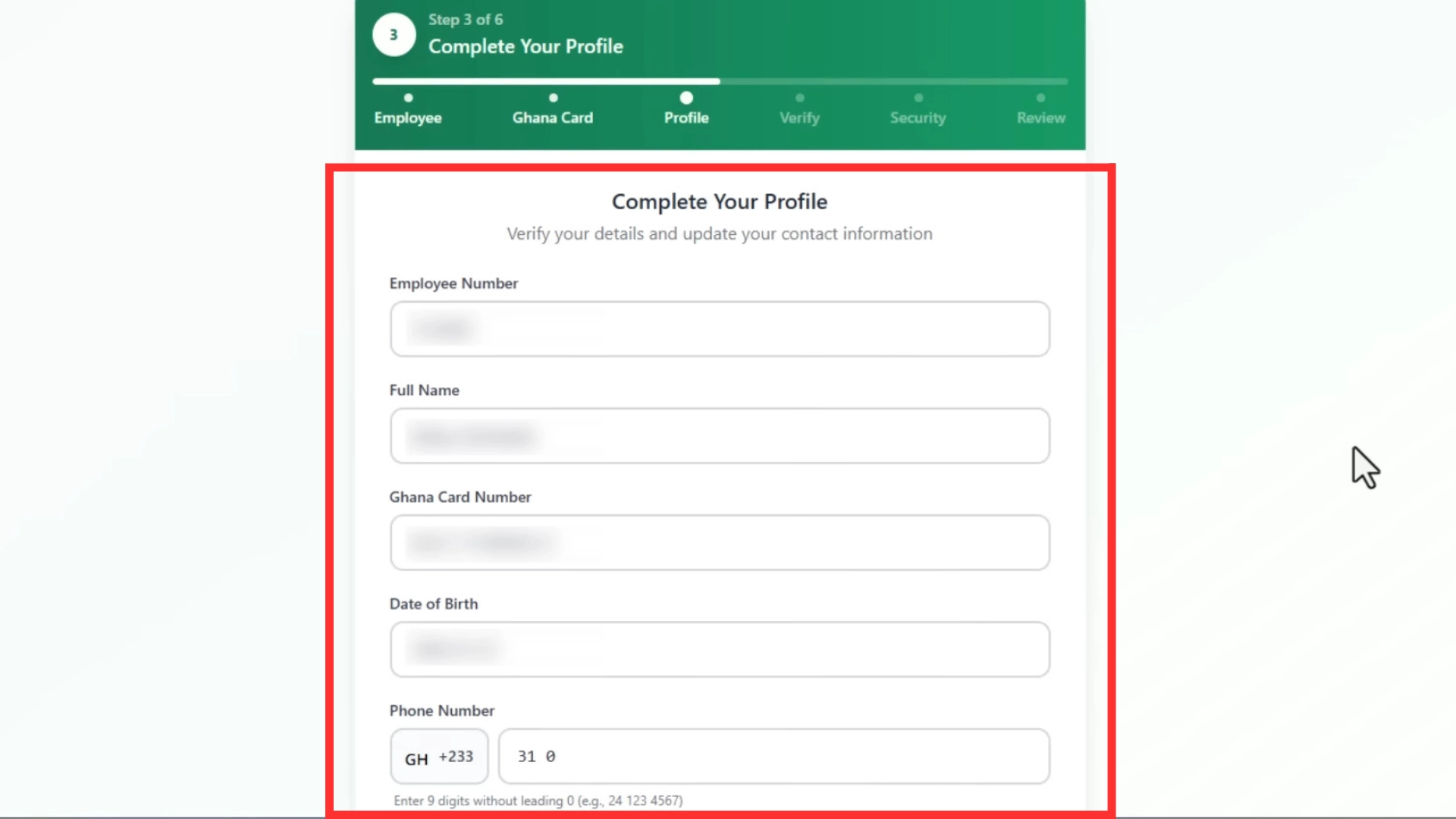
Step 5: Confirm Your Details
Check all your information carefully:
- Employee Number
- Full Name
- Ghana Card Number
- Date of Birth
If everything is correct:
- Enter your mobile number (required)
- Enter your email address (optional but its better to enter )
Then click the “Next” button.
Step 6: Phone Number
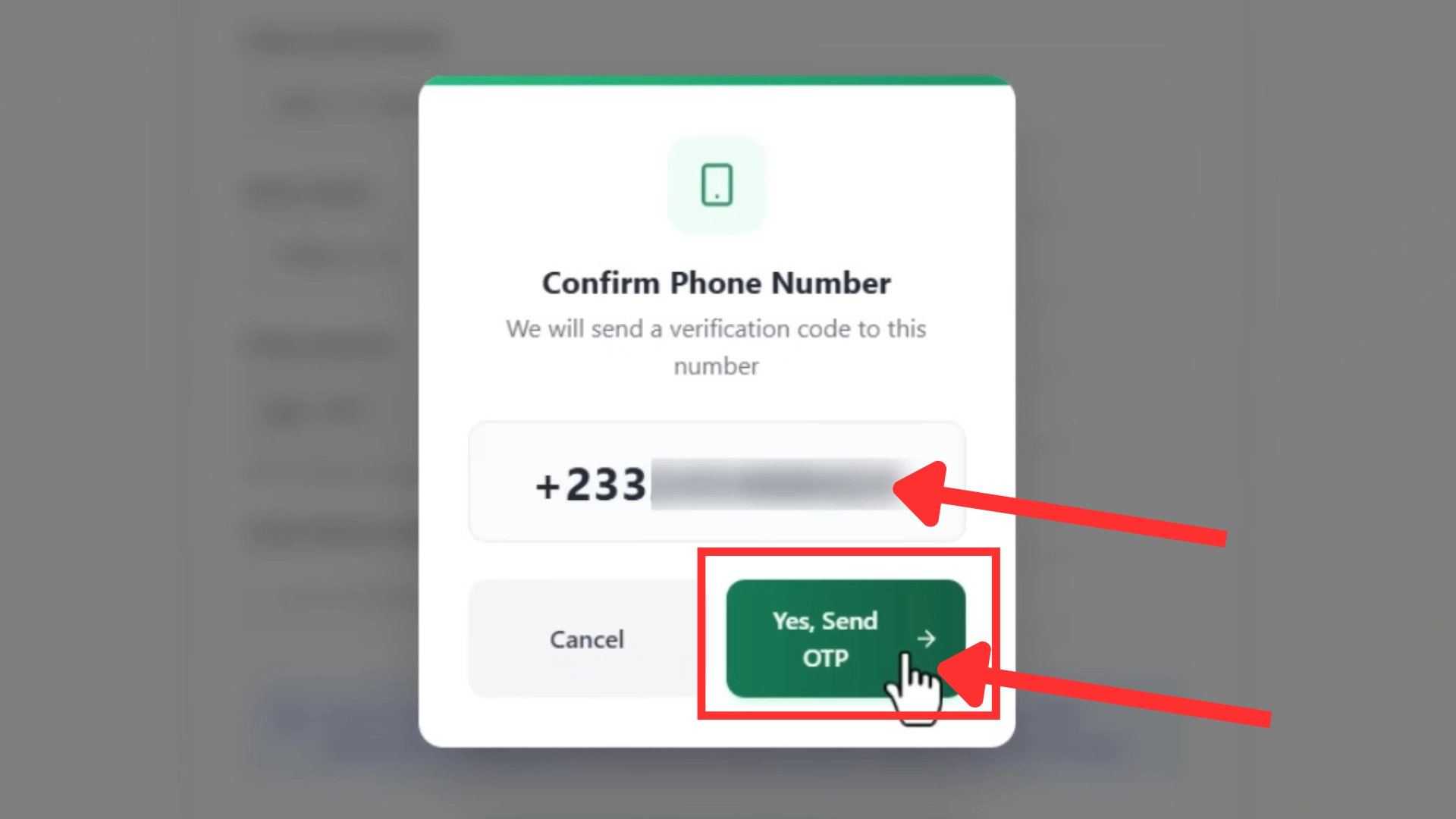
The system will ask you to confirm your mobile number.
Click the “Yes, Send OTP” button to continue.
Step 7: OTP Code
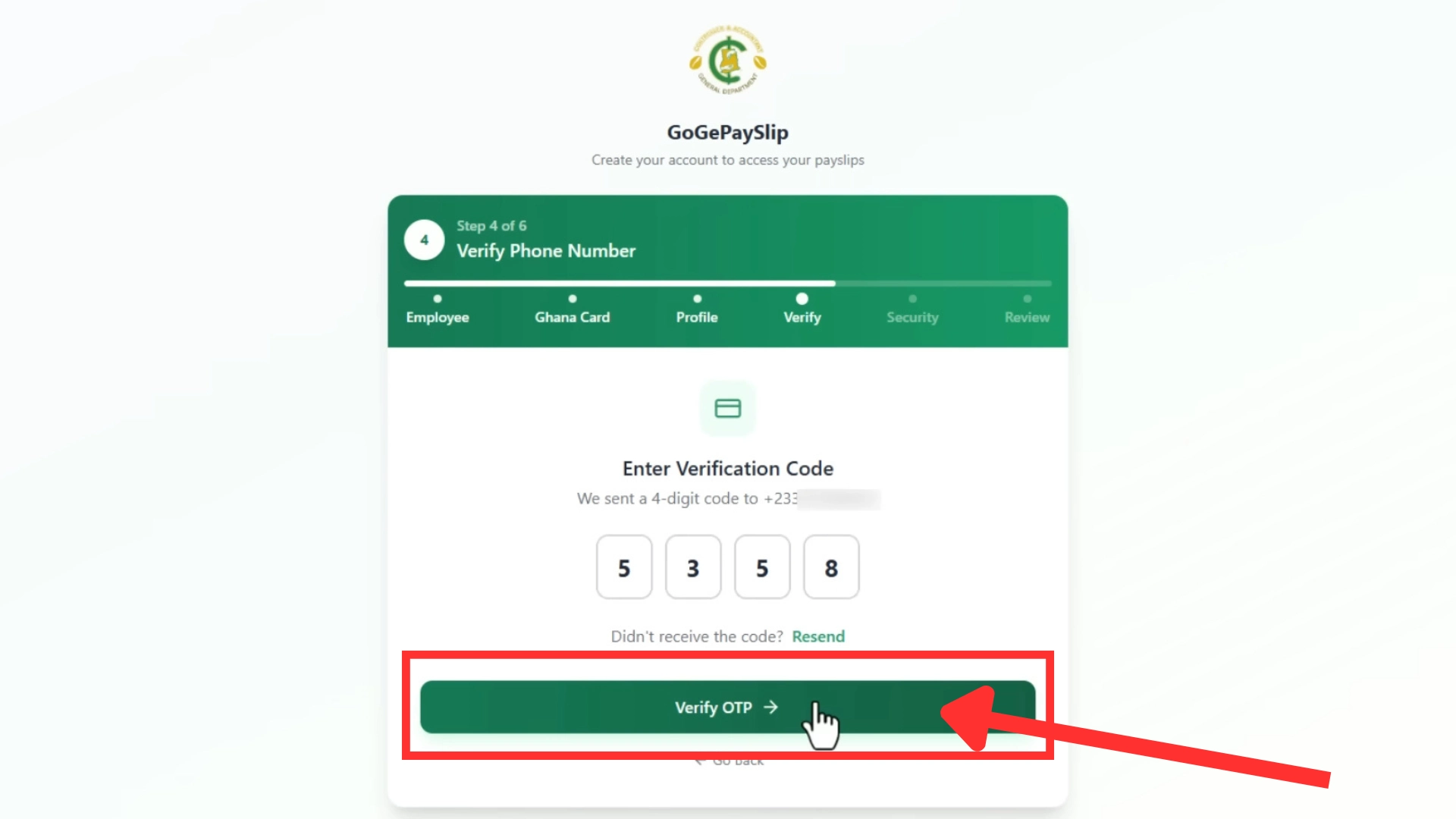
A One-Time Password (OTP) will be sent to your registered mobile number.
- Enter the OTP code
- Click “Verify OTP button”
If you do not receive the OTP immediately, wait a few minutes and try again.
Step 8: Strong Password
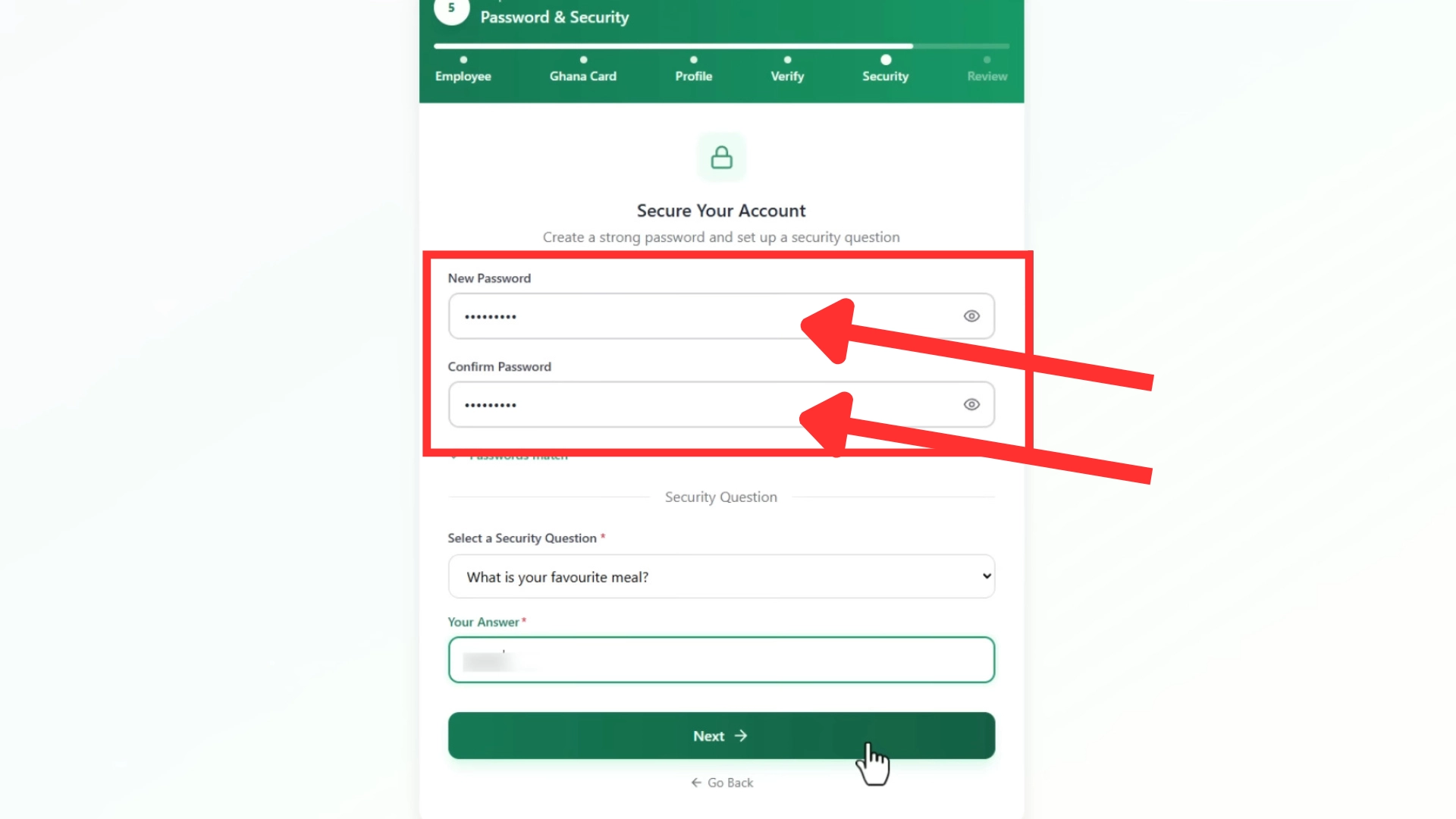
Create a secure password using:
- Capital letters
- Small letters
- Numbers
- Special symbols
Re-enter the password to confirm it.
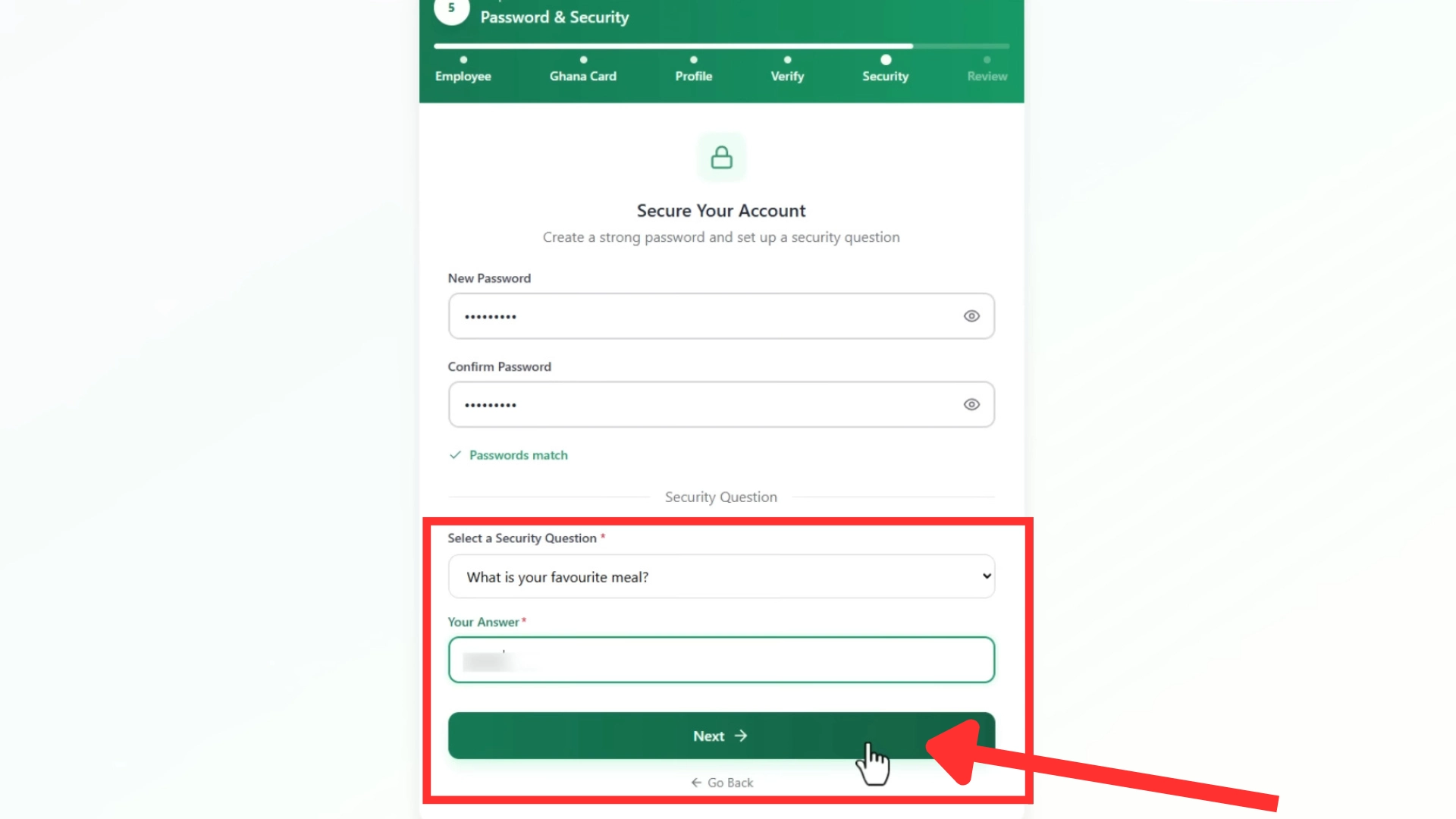
Step 9: Security Question
Select a security question and enter your answer carefully.
This will help you recover your account in the future if you forget your password.
Click the “Register” button to continue.
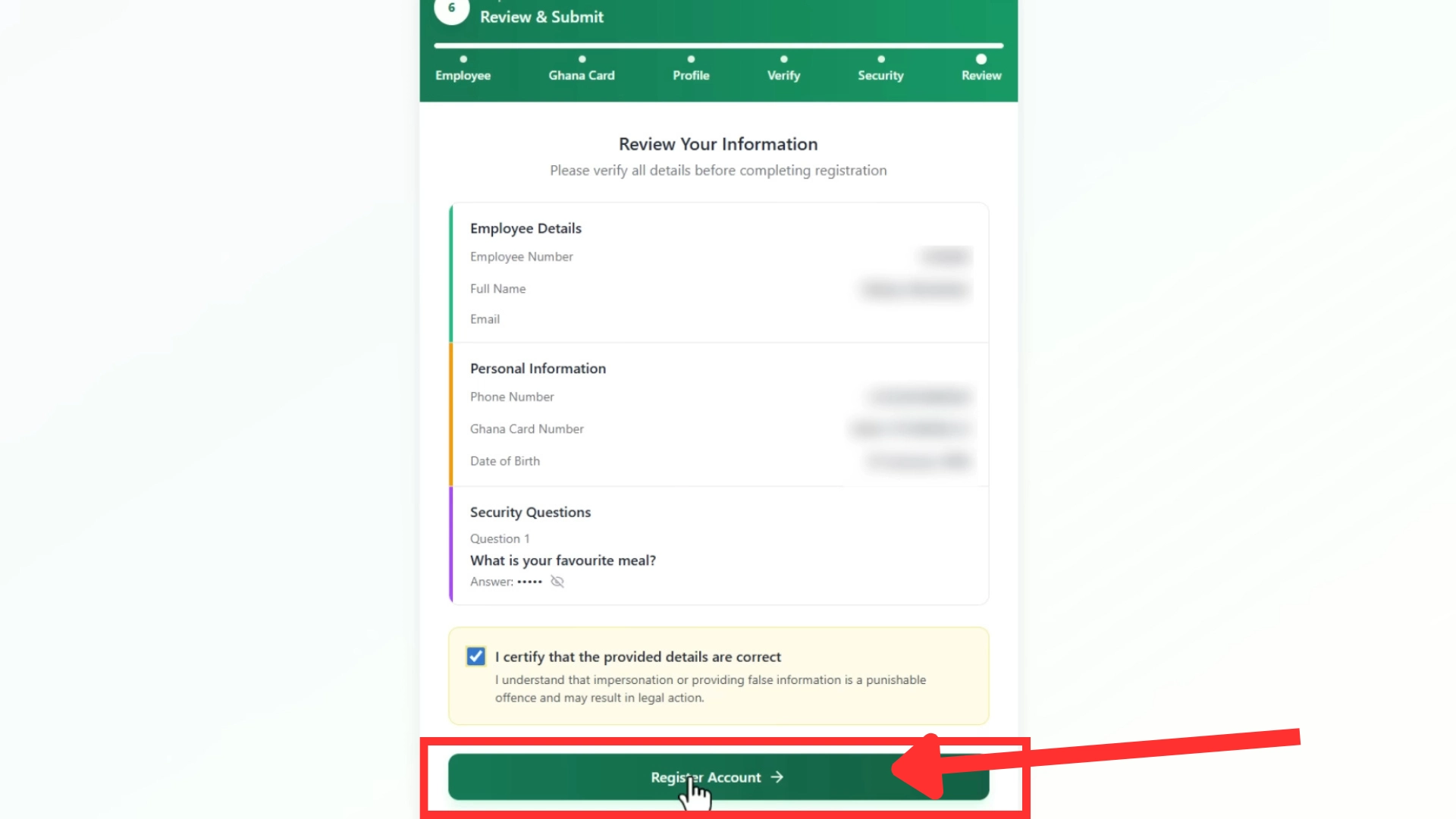
Step 10: Review and Submit
Check all your information again carefully.
If everything is correct, click the “Register Account” button.
Your GoG ePay Services registration is now complete.
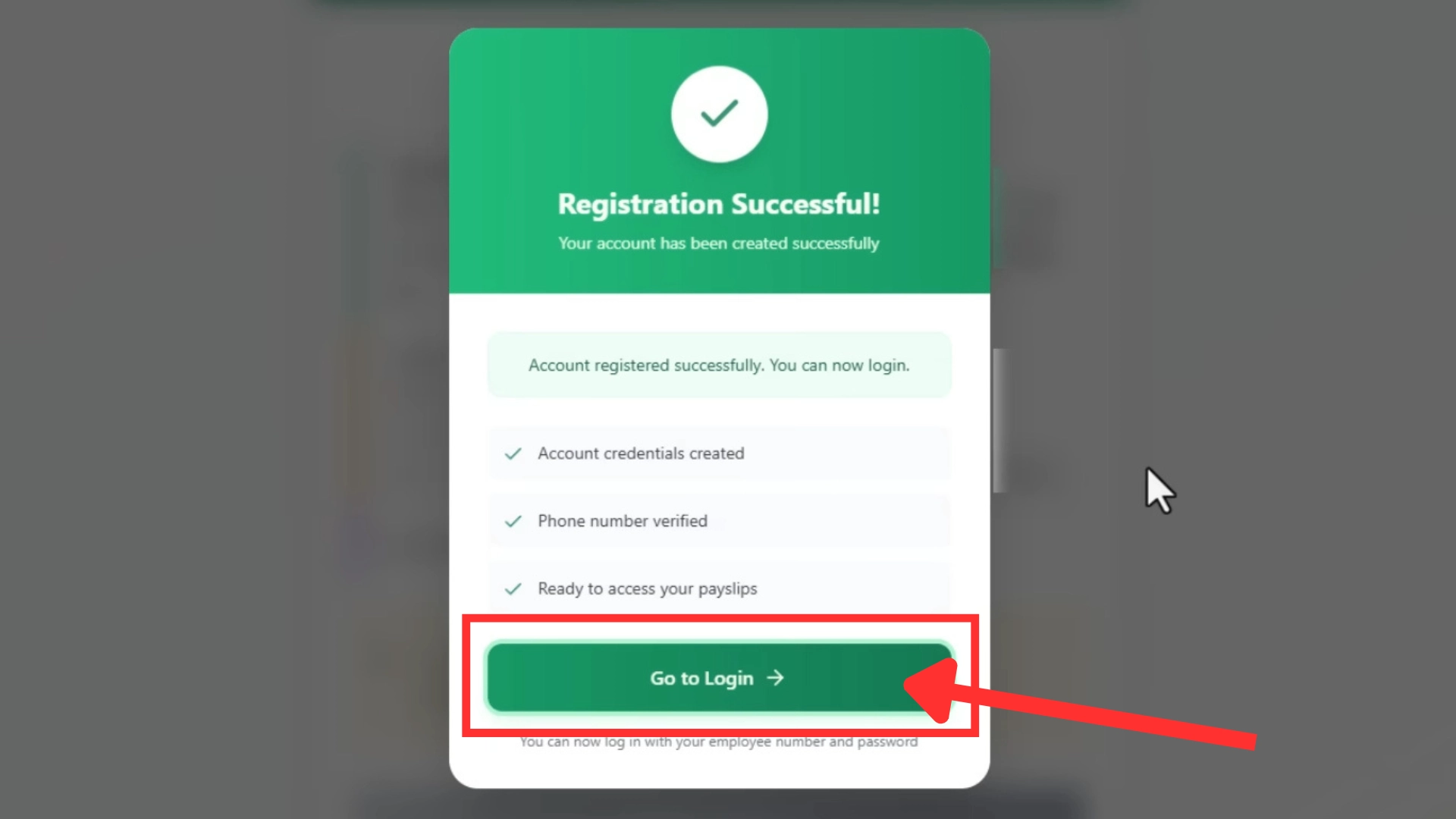
Step 11: Go to Login
A successful registration popup will appear.
Click the “Go to Login” button and enter:
- Staff ID
- Password
You can now access your dashboard and download your EPayslip online.
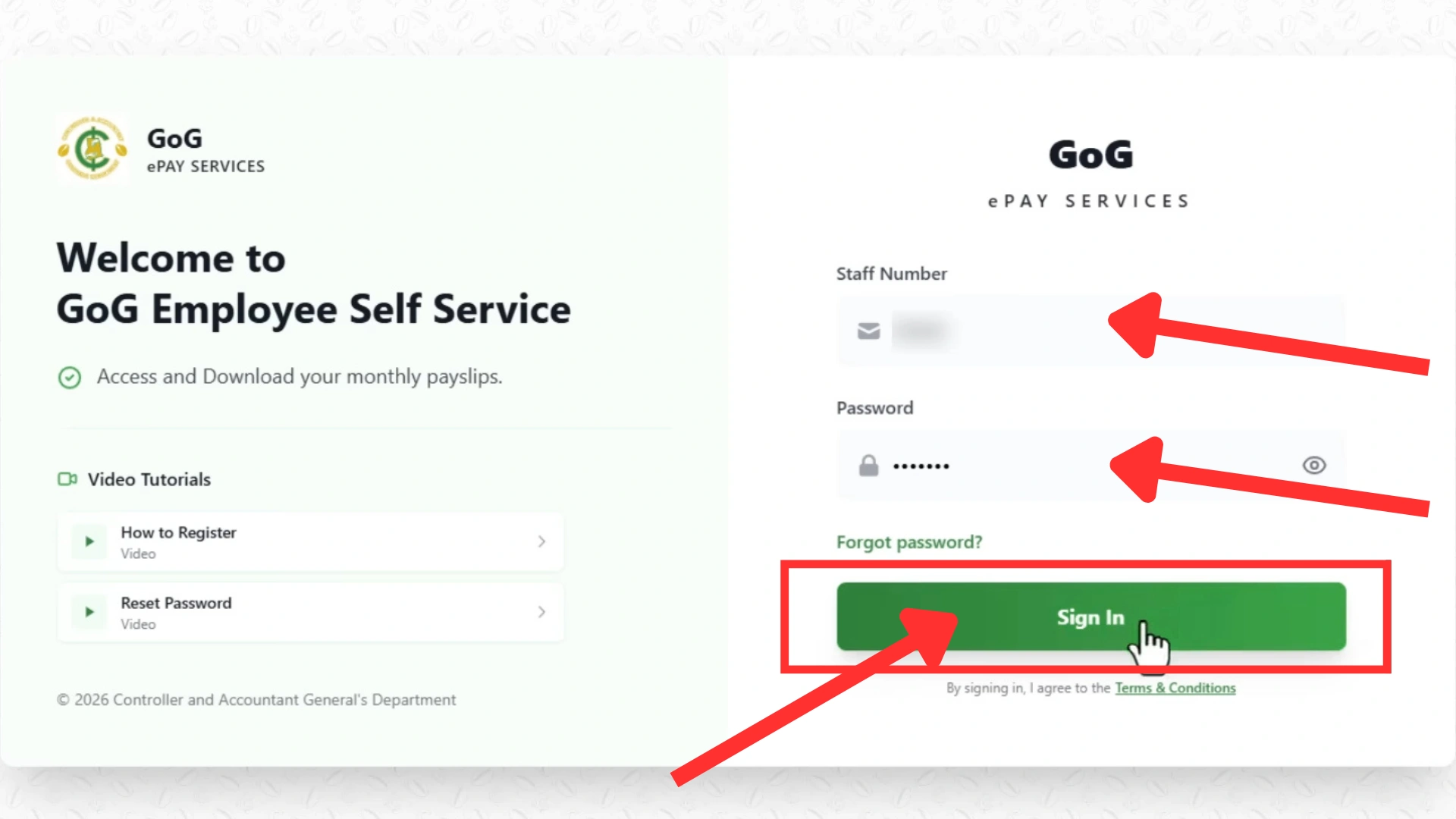
Step 12: Sign In to Epayslip Portal
Enter your following details and click “Sign In” button.
- Staff ID
- Password
You can now access your dashboard and download your EPayslip online.
Congratulations! You successfully registered on your GoGEPayslip portal.
For visual guidelines, you can watch this video:
How to Login GOGPayslip Portal?
After successful registration, Now you can Login to your salary portal by following these easy steps:
Step 1: Visit the Official Portal
To log into the Portal, visit the official Website by clicking on this link: www.gogepayservices.com.
Step 2: Enter Details
Enter your Login details by following the mentioned steps
Staff Number: Enter your Password number in the first box.
Password: Enter your Password in the second box. (You have to Enter the same Password you created at the registration time.)
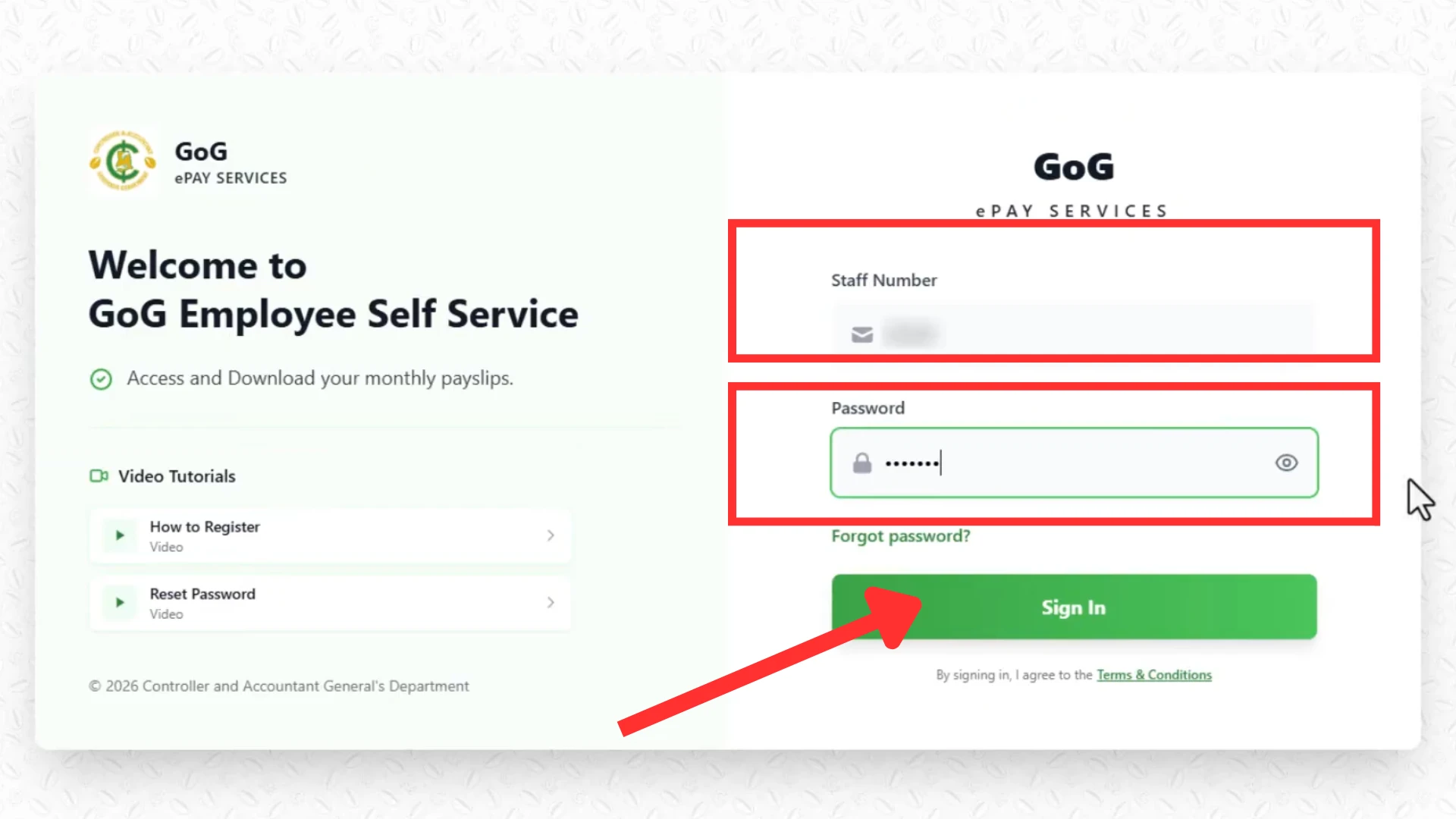
Step 3: Click Sign in
Now click the “Sign In” button and log into your Portal.
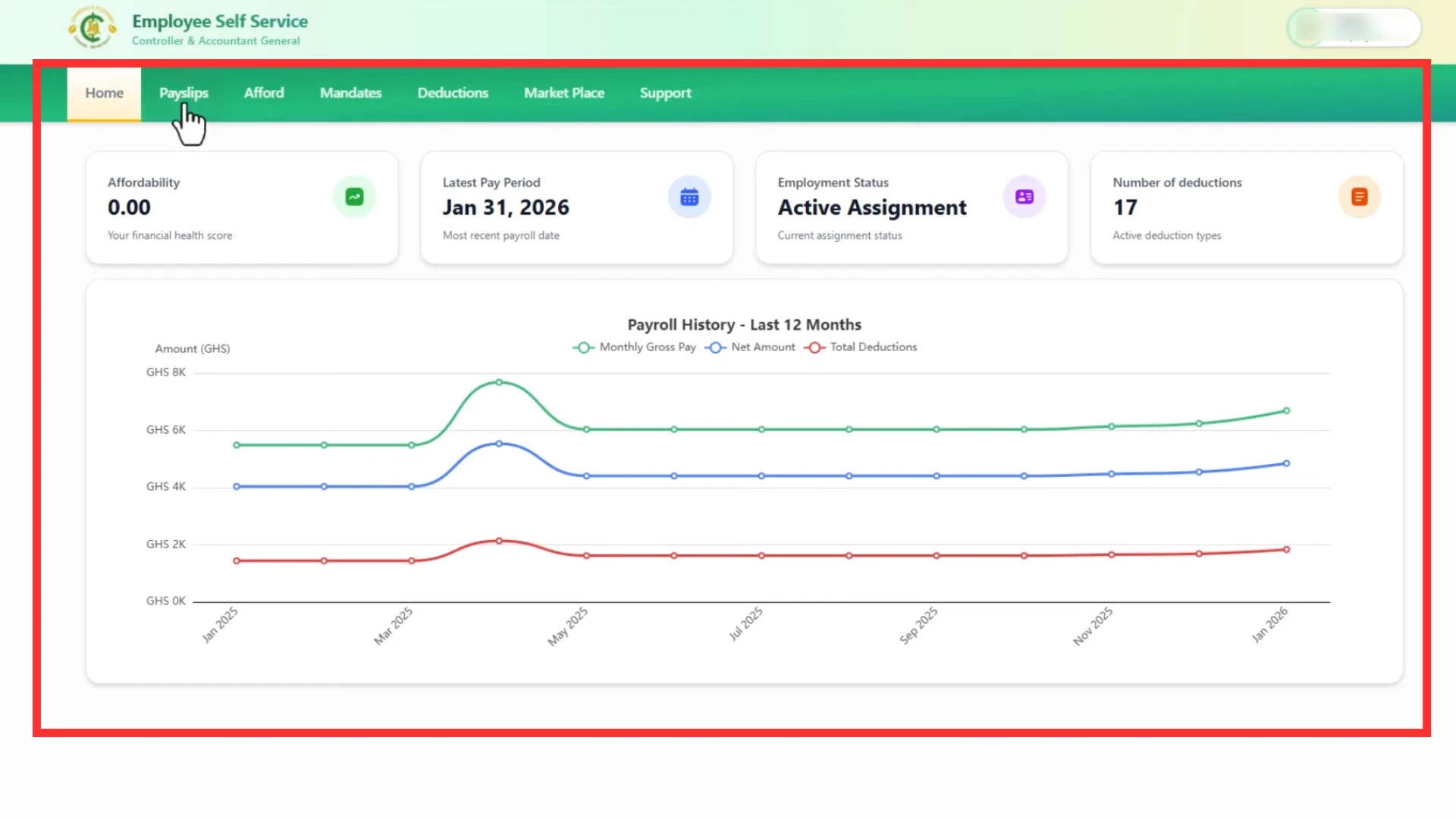
Step 4: Dashboard
Explore the features of the GoGEpayslip portal and check your employment details on the dashboard.
How to Check and Download My EPayslip?
To check the details and download your EPayslip, follow these easy steps:
Step 1: Sign In
Visit the official GOGPaySlip Website by clicking on this link: www.gogepayservices.com. Sign in to your salary slip portal by entering the Employment details and password.
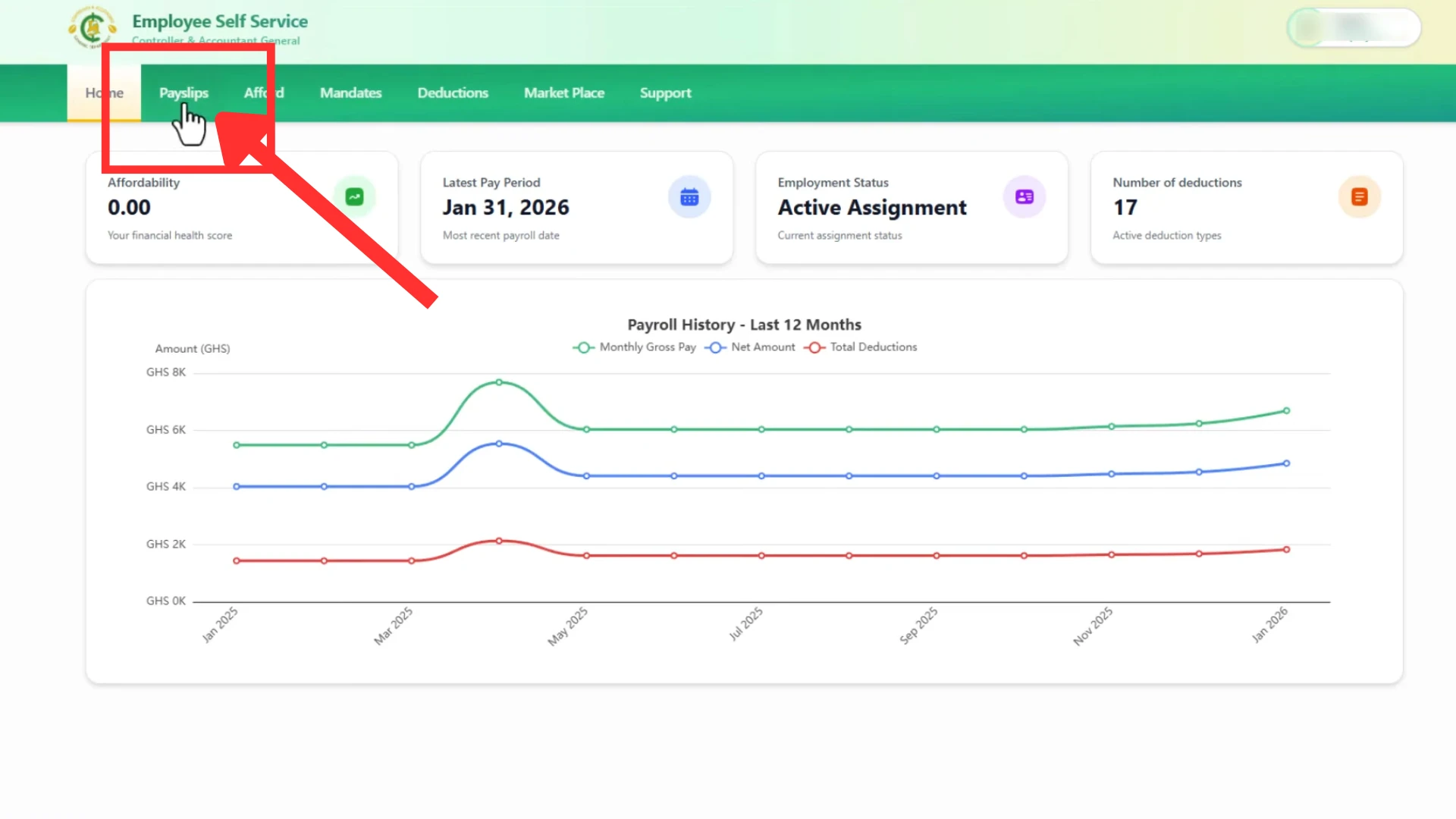
Step 2: Click “My Payslip”
As you log in to your Portal, you will see different options on the Homepage of your Portal. Click the “My Payslip” tab to open your salary slip for the current month.
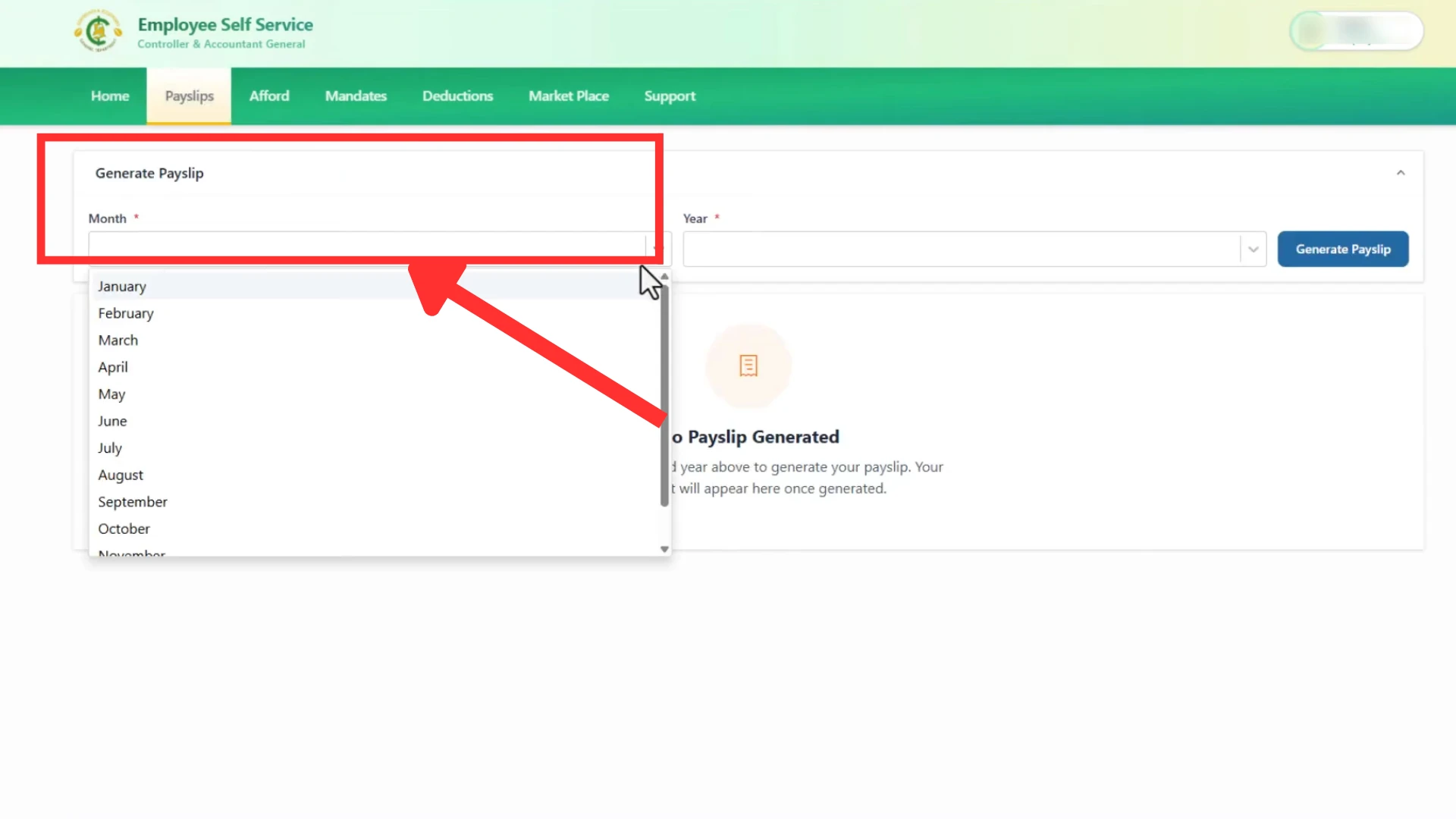
Step 3: Choose Month
Select the month for which you want to check EPayslip. For example June etc.
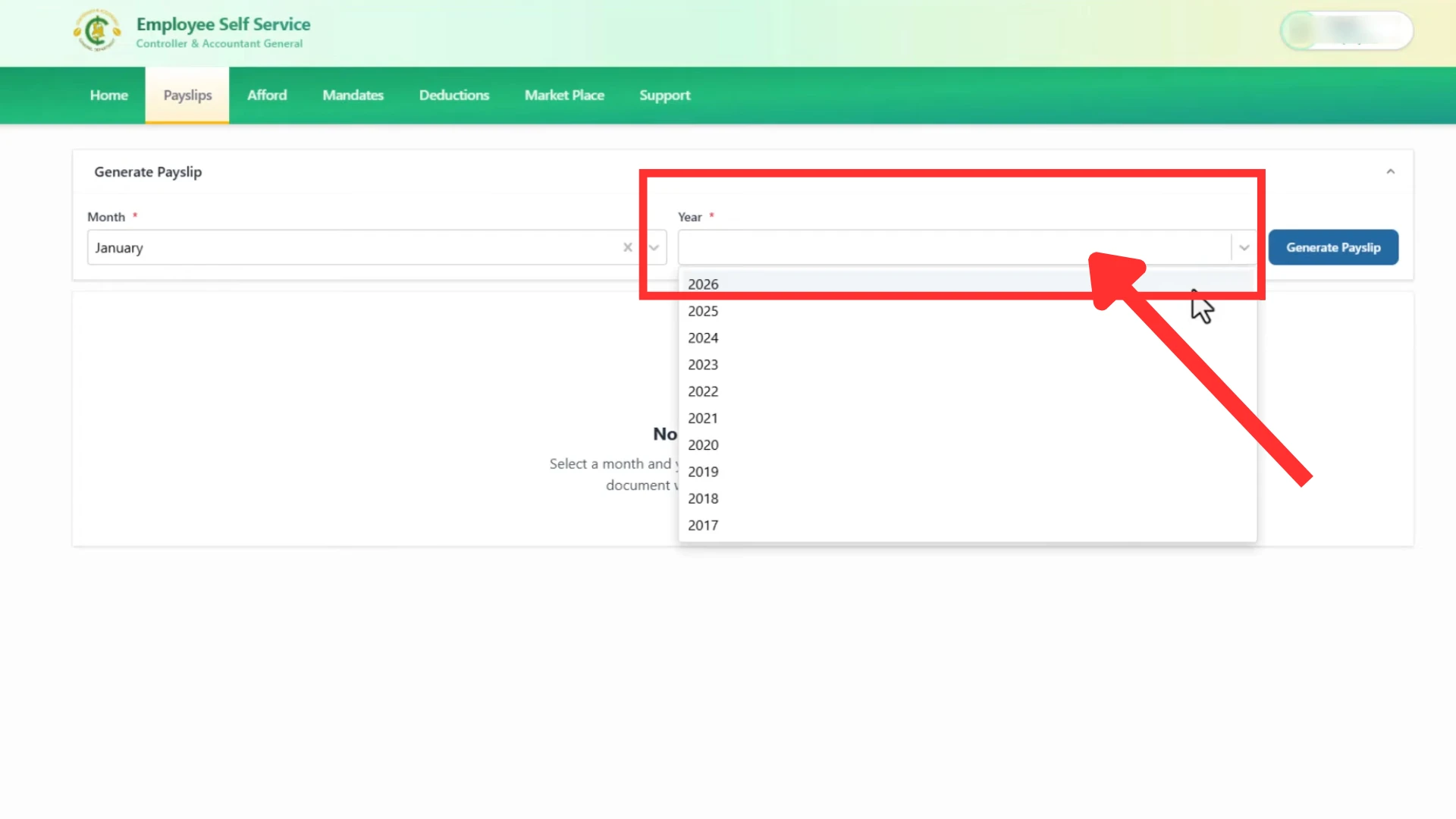
Step 4: Choose Year
Select the year of your salary. For example 2026.
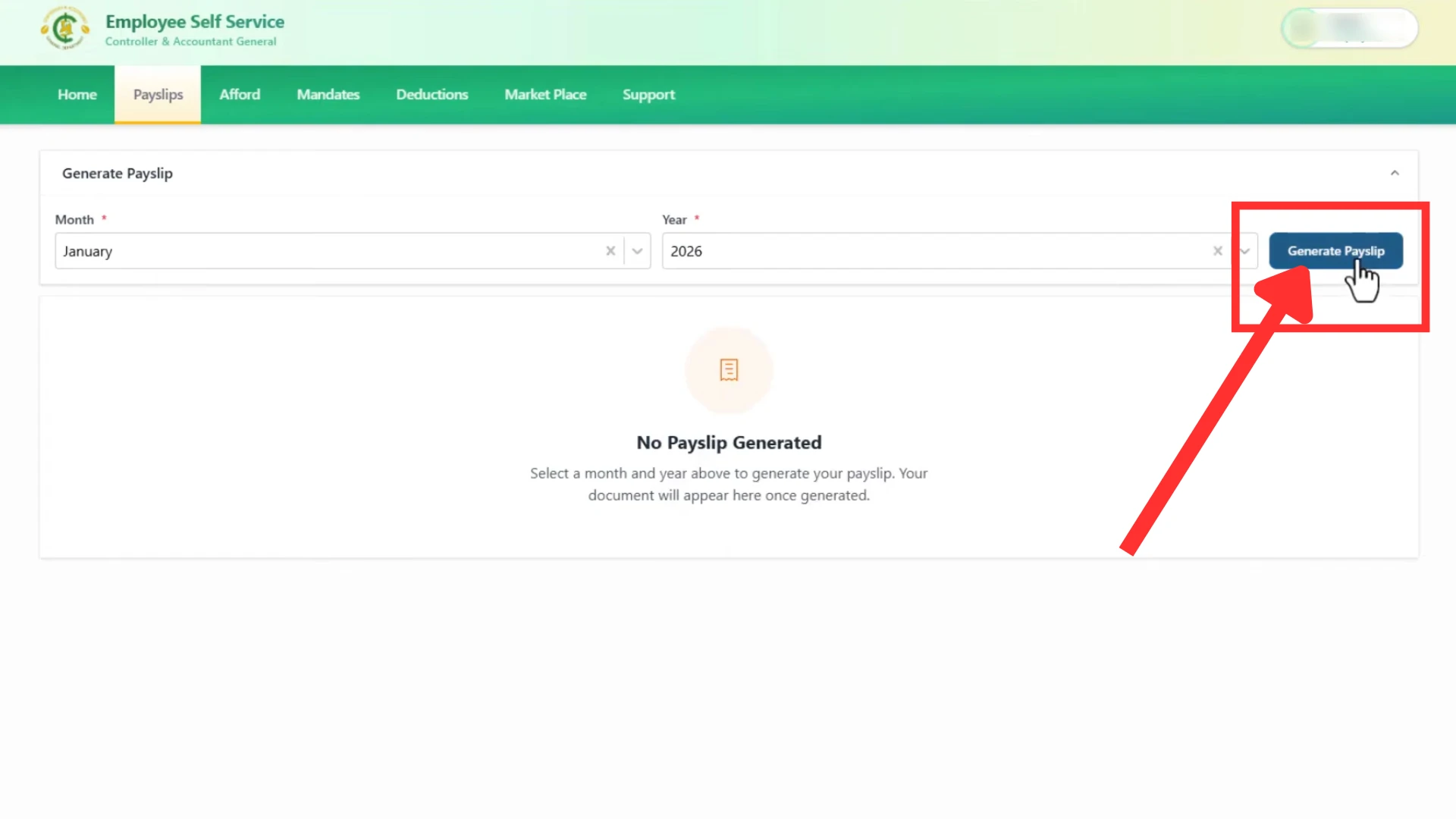
Step 5: Generate
After selecting the month and year click on the “Generate” button to veiw your salary slip.
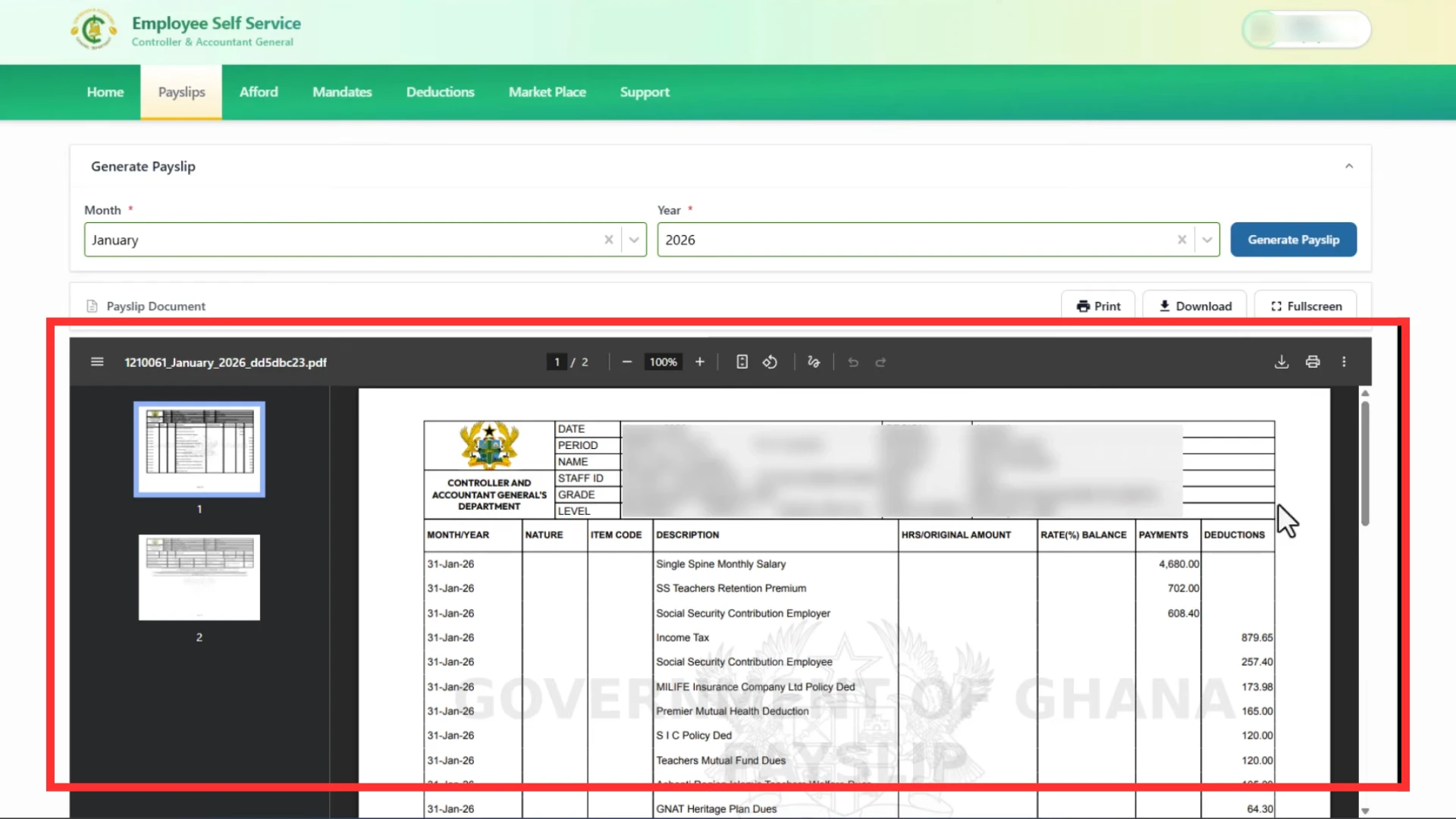
Step 6: Check the Details
Check the complete details of your Payslip carefully, like basic salary, tax, deductions and net salary.
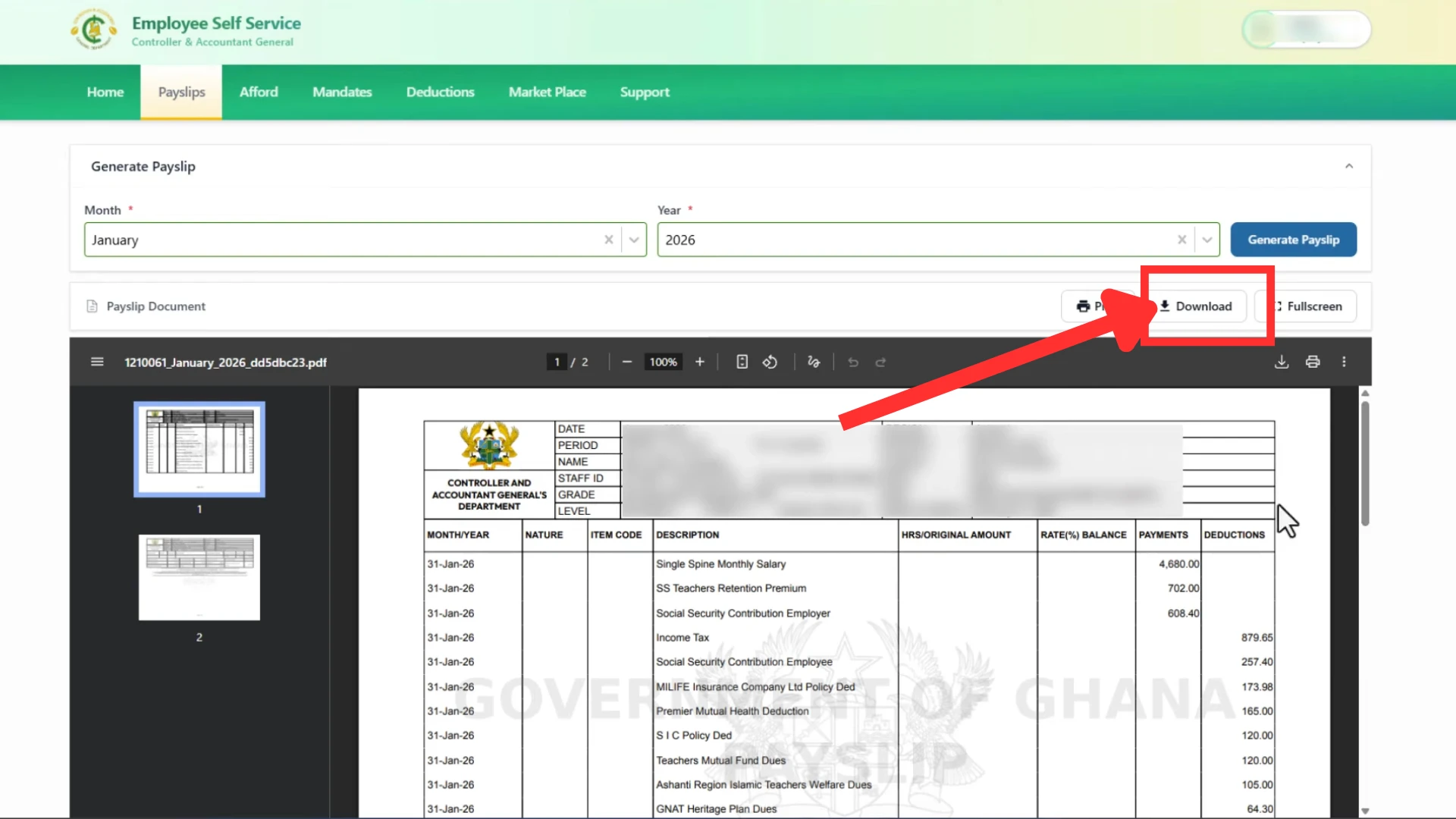
Step 7: Download
Click on the “Download” button to save your salary slip on your device for later use or to print your salary slip.
How to Recover Password of EPayslip Account?
Did you forget your salary slip portal’s Password? Don’t worry! You can easily reset your password and recover your account in just a few minutes. Follow these simple steps to access your account.
Step 1: Go to the GOGPayslip Portal
Go to the official Website of your salary slip portal by clicking on https://gogepayservices.com
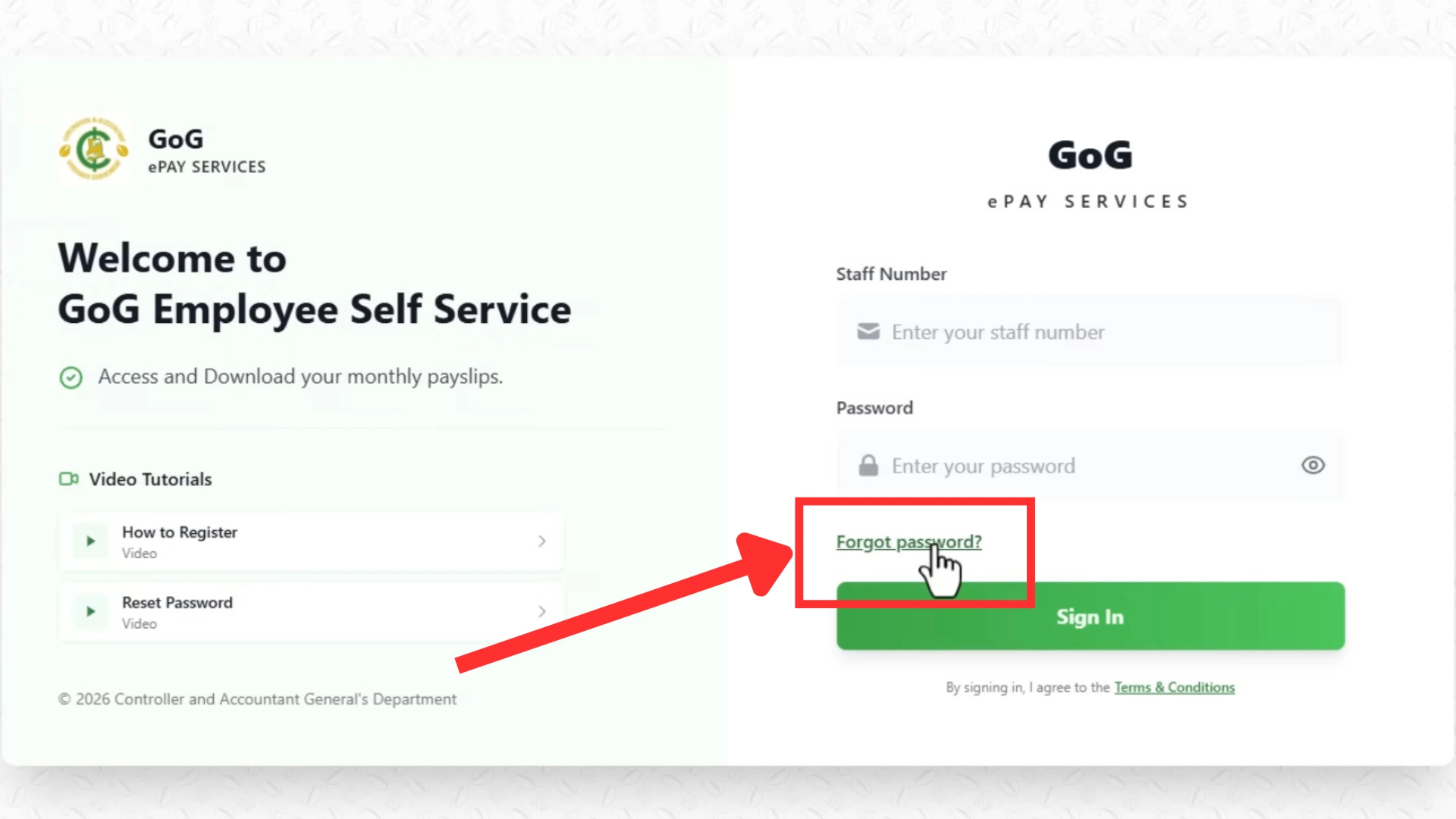
Step 2: Forget Password
On the login page of the Portal click on the “Forget Password” button, shown in the lower left corner.
Step 3: Write Employee Number
Enter your employee number and click on the “Continue” button.
Make sure to enter the correct employee number.
Step 4: Answer Security Question
Answer the security question that you created during the registration process.
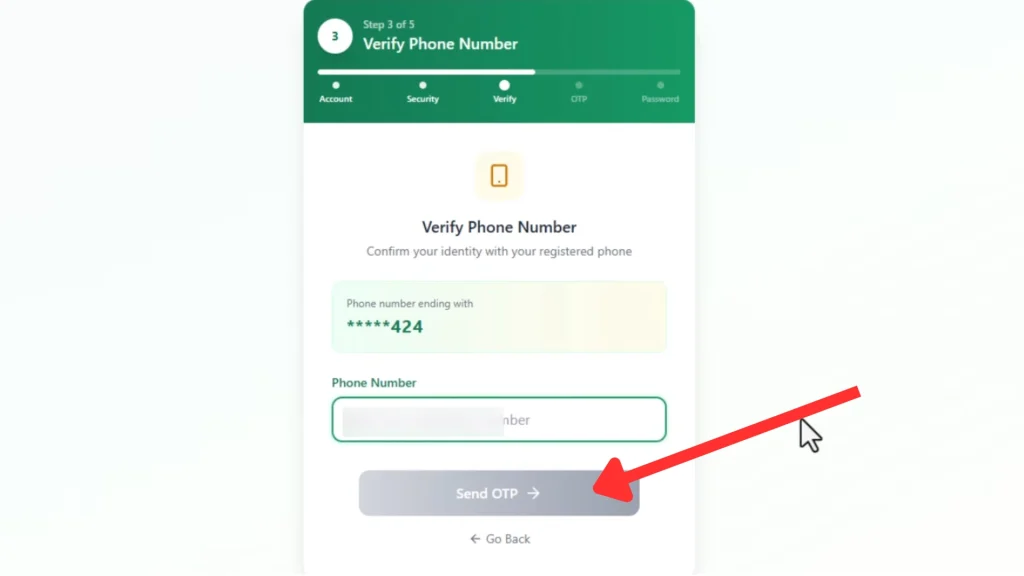
Step 5: Enter Phone Number
Enter your mobile number which is registered on gogepayservices portal.
The mobile number is important because you will recieve OTP and other updates on this mobile number.
Step 6: Recieve OTP Code
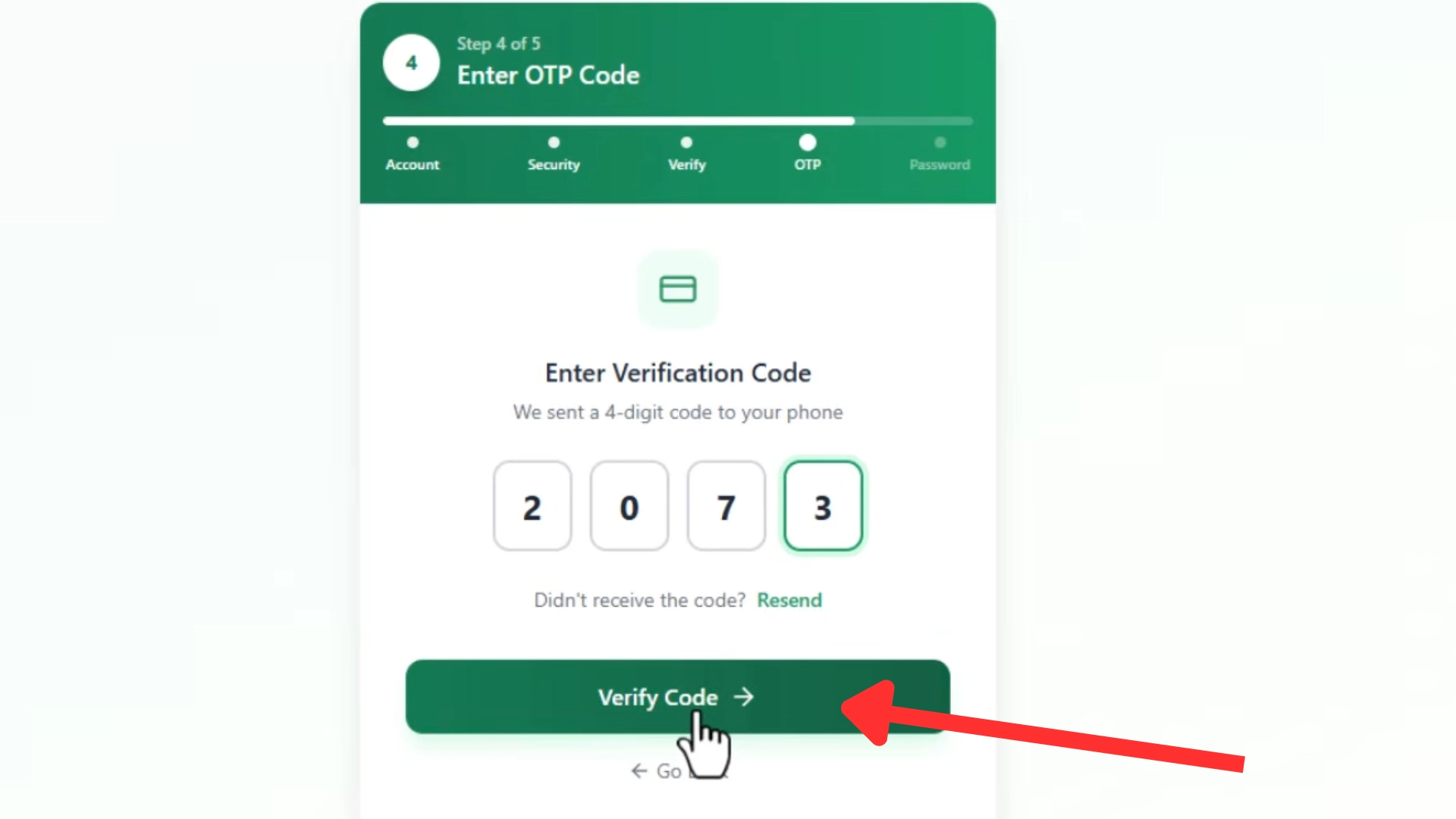
Gog epay services will send you an OPT code on your phone number. Enter this OTP code to continue the process.
Congratulations! You successfully recovered your GoGEpayslip portal account.
Step 7: New Password
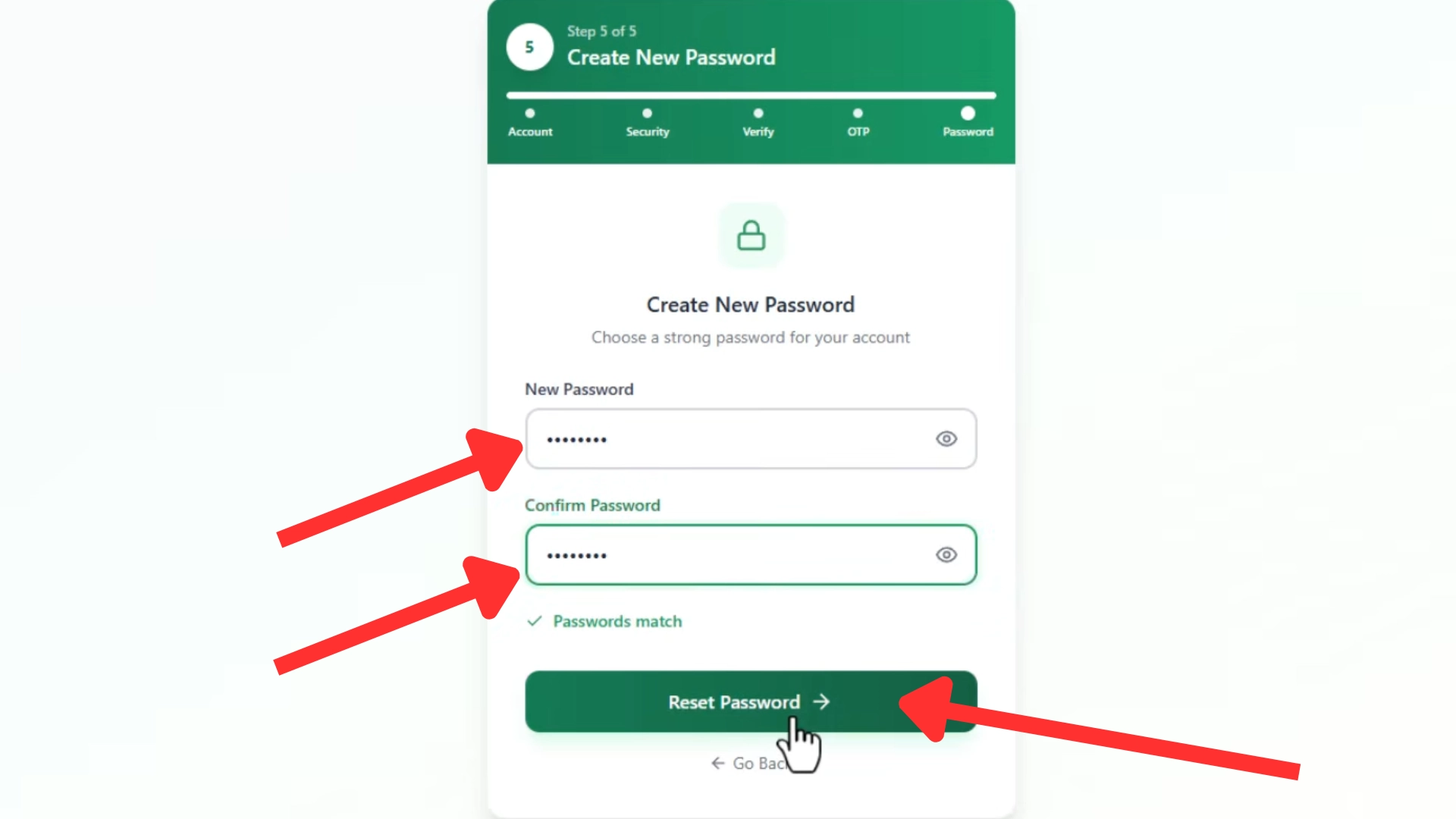
Create your new password. Your password should be:
- At least 8 characters long
- Include letters
- Include numbers
- Include special characters (@,#,/,&,!)
Confirm Password by entering the same password again.
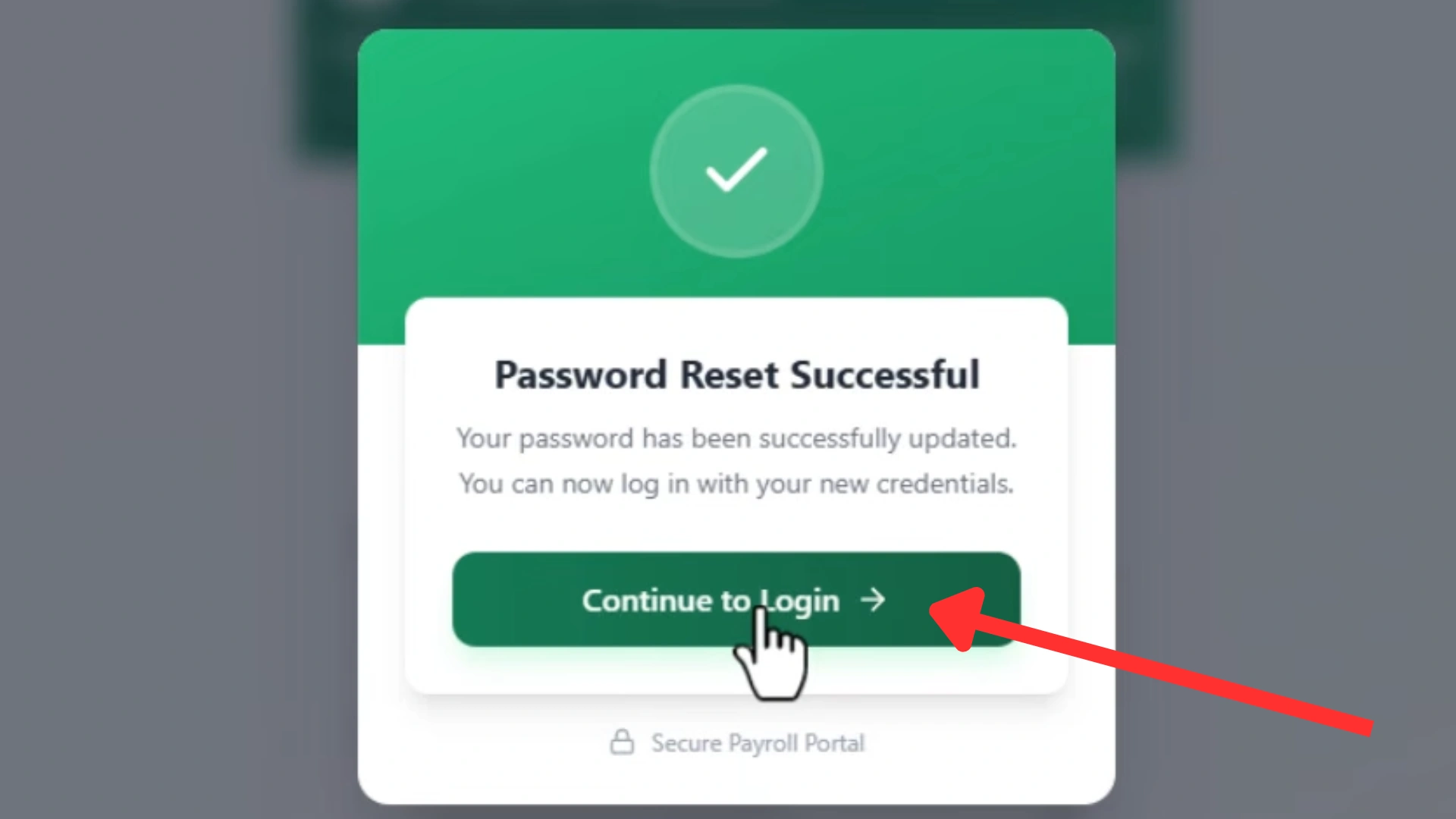
Step 8: Reset Password
After creating your new password, click the Reset Password button. The system will now reset your password.
Now click on the “Continue to Login” button to Sign In to your epayslip portal.
How to Change your GOGPayslip Phone Number?
To change your phone number in the Portal, follow these steps:
Step 1: Login Portal
Login to your official salary portal by clicking https://gogpayslip.com
Step 2: Navigate to Phone Number
On the top (right) corner of the Homepage, you will find:
Click on the Phone number.
Step 3: Change Phone Number
Step 4: Confirm the Updates:
After you save the new Phone Number in the Portal:
Download and Install CAGD EPayslip Mobile App
The Government of Ghana and CAGD launched official EPayslip mobile application to provide more ease to GOG workers. Now employees can download and install mobile app in their android phones. GOGPayslip mobile App allows users to check their salary details and download their payslips from anywhere they want. It is available on the Google Play Store, the app is free to download and designed for all Ghanaian government employees.
Understand Your EPayslip Details
Payslips of GoG Employees show different types of information which is very important for GoG Employees to understand. Some details of your Payslip are mentioned below.

Basic Salary: Your fix Basic salary that GoG Employees get every month.
Travel Allowance: The travel allowance helps public servants manage their travel expenses.
Medical Allowance: Medical allowance for GoG Employees to cover their medical expenses.
Provident Fund (PF): Every month a fixed amount of salary is deducted and added to the employee’s retirement fund.
Income Tax: The Government of Ghana cuts a Fix Amount of salary as income tax.
Loan Deductions: If an employee opts for Ghana’s loan scheme and now pays back installments of loan from his monthly salary.
Benefits of the EPaySlip
For GOG Employee, salary slips are very important in their Employment career. Some important points are mentioned below:

Proof of Income: When a GoG worker applies for any Government scheme, for example (a loan, credit card, or insurance), the Payslip is used as proof of good income.
Tax Filing: It helps GoG Employees file their taxes and calculate their annual taxes.
Loan Approval: Banks demand the Payslip to check a person’s eligibility for a loan.
Budget Planning: GoG Employees can plan their monthly and annual budget by analyzing their payslips.
Key Features of GOGPaySlip Portal
The payslip portal offers a number of features to the Employees of Ghana. The GoG Employees can perform these functions on the Portal:
Key Benefits of GOGEPaySlip Portal

GOGPaySlip: What’s New in 2026?
The Government of Ghana is continuously working on the GOG payslip portal to make the experience of employees better and improve salary and wages system. With digital advancements in recent times the E-Payslip portal also improved. In 2026, the Government of Ghana made several changes to make it easy and improve the employees’ interaction with the portal. Here are some key improvements:
1. Easy Login Process
Now, employees can log into their salary account more easily and in less time. Employees only need their unique “Employee number” and “Password” to log into their portal.
2. Advanced Security Measures
Now, your salary account is more safe and secure than ever before. No third person or organization can access your account. Your account is safe until you provide your login credentials to someone else.
3. Mobile Friendly
Knowing the usage and accessibility of smartphones these days, the Government of Ghana made this platform more mobile-friendly. Now, employees can check and download their salary slips from their mobile phones.
4. Environment Friendly
The Government of Ghana is committed to environmental sustainability, for this purpose it introduced the E-Payslip to replace the paper Payslip in the Payroll system. The E-PaySlip has reduced the bad impact on the environment by reducing the use of wood to make papers. Environment Friendliness makes the GOGPayslip an evergreen project of Ghana.
Portal Helpdesk
The Government employees of Ghana can contact CAGD officials and customer support regarding your queries or thoughts on this official helpdesk of GOGPayslip.
Email: info@gogpayslip.com
CAGD Phone: +233 (0) 302983507
CAGD Postal Address: P.O. Box M79, Ministries, Accra, Ghana, GPS: GA-110-7376
GOGPayslip Call Centers
GOG Employees can contact their regional offices in case of any inconvenience or problems on these regional contact numbers to get help or any other information about your Payslip Portal.
- 0242162781
- 0552925395
- 0245289771
- 0505660003
- 0243340355
Conclusion
GoGPayslip is a secure online platform designed for Government of Ghana (GoG) employees to easily access their monthly EPayslips. This Payroll system was developed by the Controller and Accountant General’s Department (CAGD), this system makes salary management more efficient for public sector workers. After registering and logging into the GoGEPayslip portal, employees can check and download and manage their payslips, Change association, Manage SSF and GRA reports, check Deductions and perform many other tasks. Employees can contact their regional offices or the helpline of Portal in case of any inconvenience.