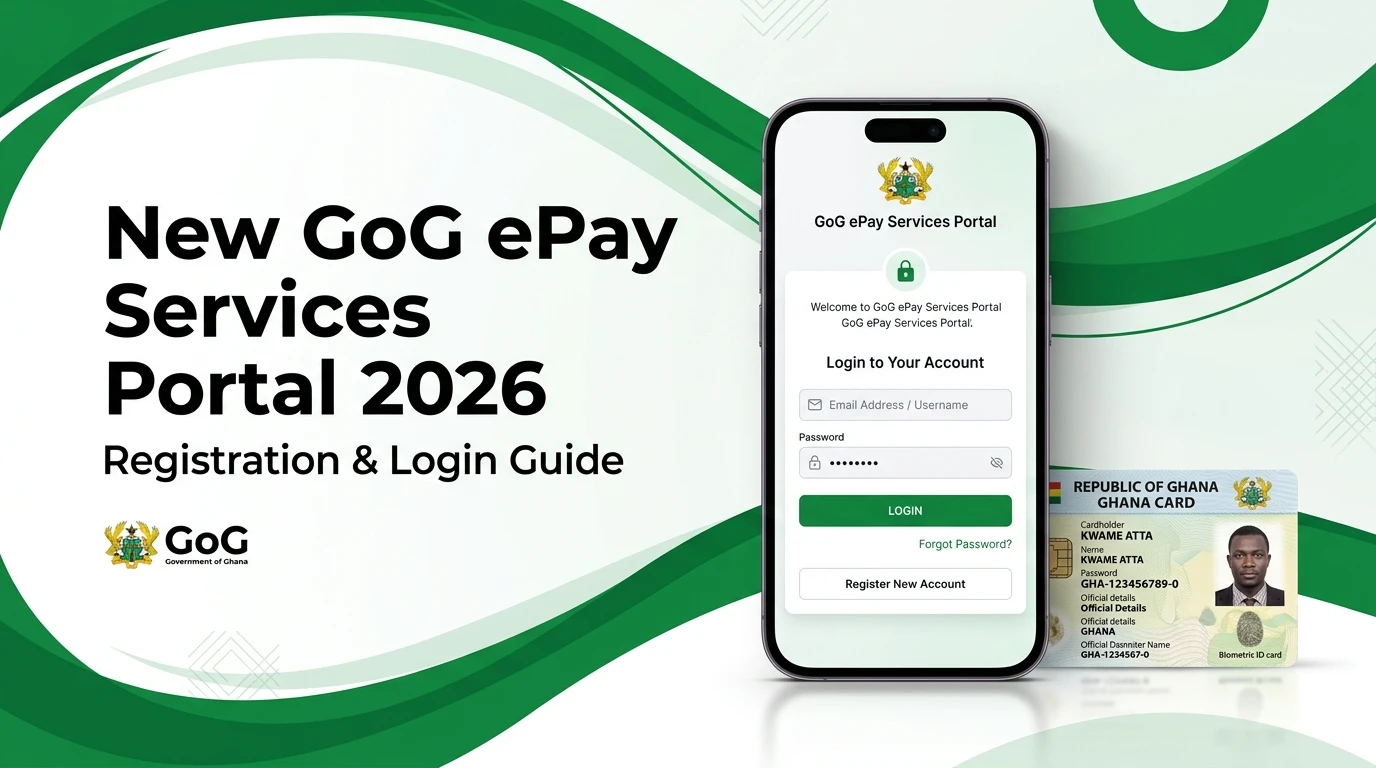
New GOG Payslip Portal 2026 | GoG ePay Services Registration & Login Guide
The Government of Ghana has officially introduced the New GOG payslip portal in 2026. The new system is known as GOG ePay Services or gogepayservices, and it replaces the old GOGPayslip website that public servants were using before.
If you are a government worker in Ghana, you must now use the New CAGD epayslip Portal to access your monthly salary slip.
Many employees are currently confused about:
- How to register on New GOG ePay portal
- How to complete GoG ePay Services registration
- Why OTP is not coming
- How to reset password
- Whether the old portal is still working
In this detailed guide, we will explain everything, so every Ghanaian public servant can understand and use the system without stress.
What is GOG ePay Services?
GOG ePay Services (also written as gogepayservices) is the official Ghana government payslip portal launched in Feb 2026 by the Controller and Accountant-General’s Department (CAGD).
This new platform allows:
- Government workers to view payslips online
- Download monthly salary slips
- Check deductions
- View tax (GRA) details
- Check SSF contributions
- Apply for loan affordability letters
The system is part of Ghana’s digital transformation in public payroll management.
The old portal has been replaced by this New GOG epayslip Services portal, so all employees must register again.
Why Did CAGD Launch the New Payslip Portal?
The CAGD payslip 2026 upgrade was introduced mainly for:
1. Better Security
The new system requires:
- Ghana Card (NIA number)
- OTP phone verification
This prevents unauthorized access.
2. Identity Verification
Every employee must now verify identity using Ghana Card. This reduces payroll fraud.
3. Improved Performance
The new GOG payslip portal is more stable and designed to handle more users.
4. Stronger Password Recovery
The password reset system is now more secure than before.
Requirements for GoG ePay Services Registration
Before starting your GoG ePay Services registration, make sure you have:
- Your Staff ID / Employee Number
- Your Ghana Card (NIA number)
- A working Ghanaian mobile number
- Internet connection
- Device (phone or computer)
Without a Ghana Card and phone number, registration will not work.
How to Register on the New CAGD ePayslip Portal (Step-by-Step)
This is the most important section. Follow these steps carefully.
Step 1: Visit the New CAGD Payslip Website
Open your browser and go to: https://gogepayservices.com. This is the official Ghana government payslip portal 2026.
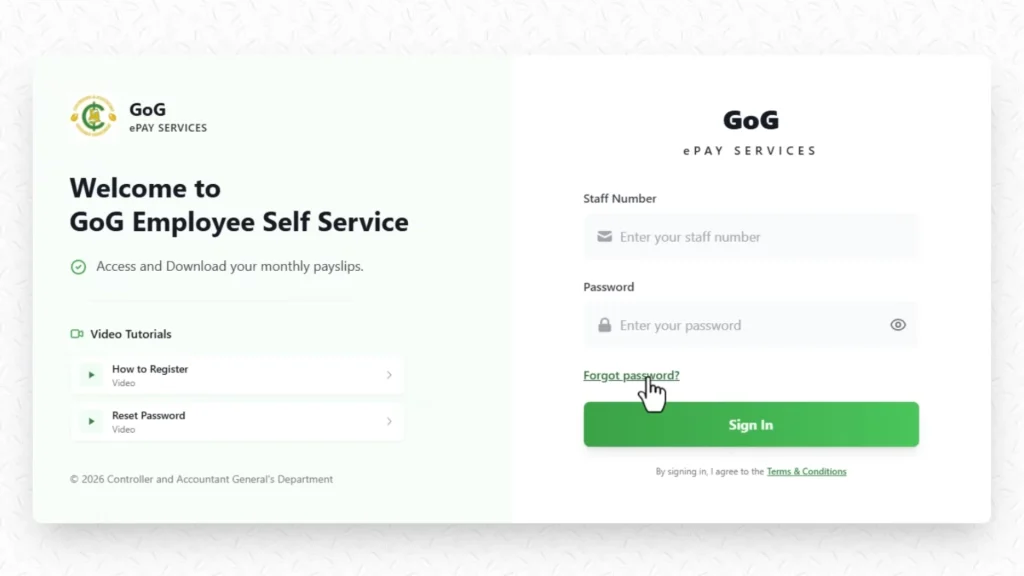
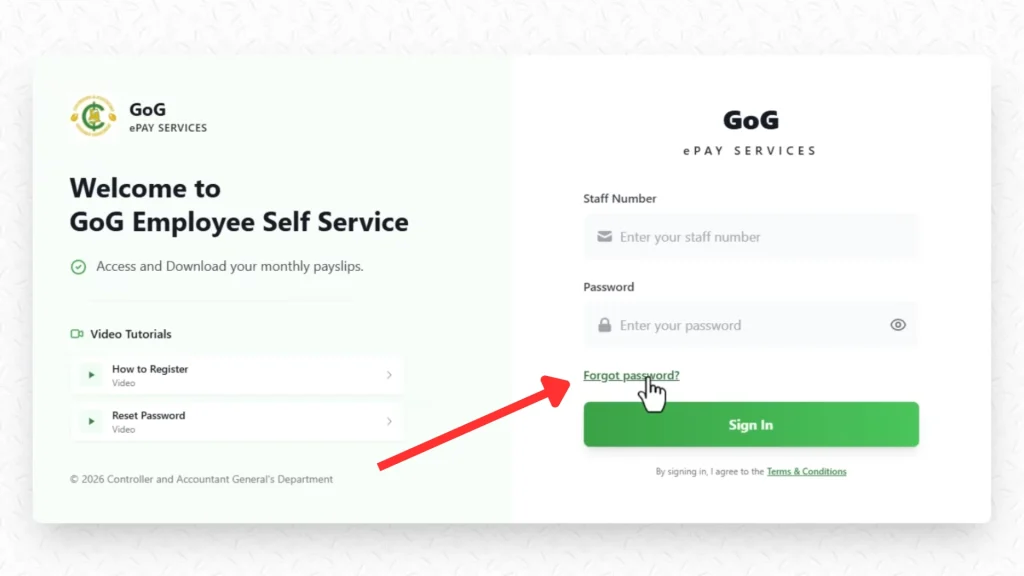
Step 2: Click on “Forgot Password”
Many people get confused here.
On the new portal, the “Forgot Password” button is also used for first-time registration. Click on it.
Step 3: Enter Your Employee Number
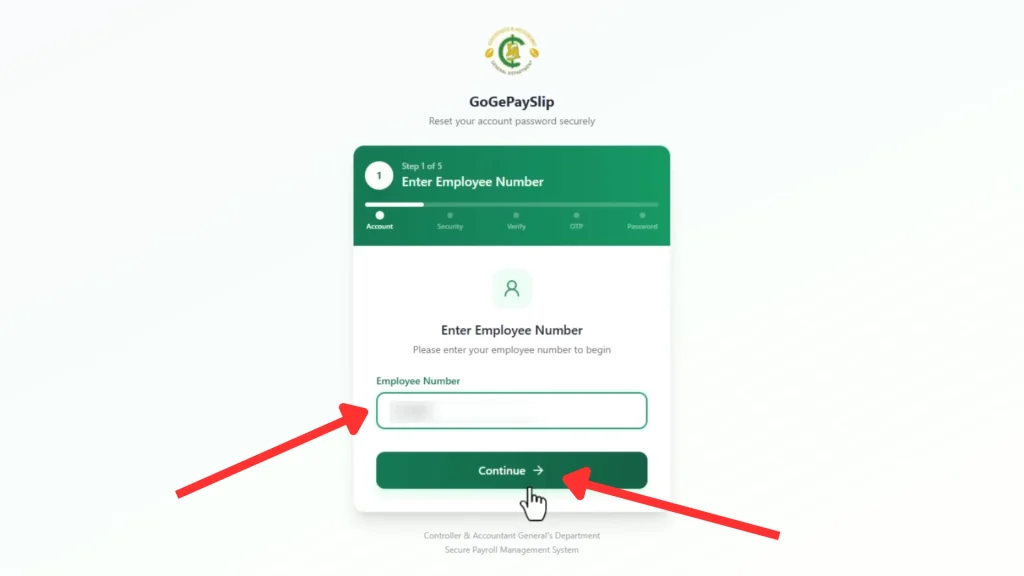
Type your full staff ID correctly. Click Continue.
Step 4: Enter Ghana Card Number
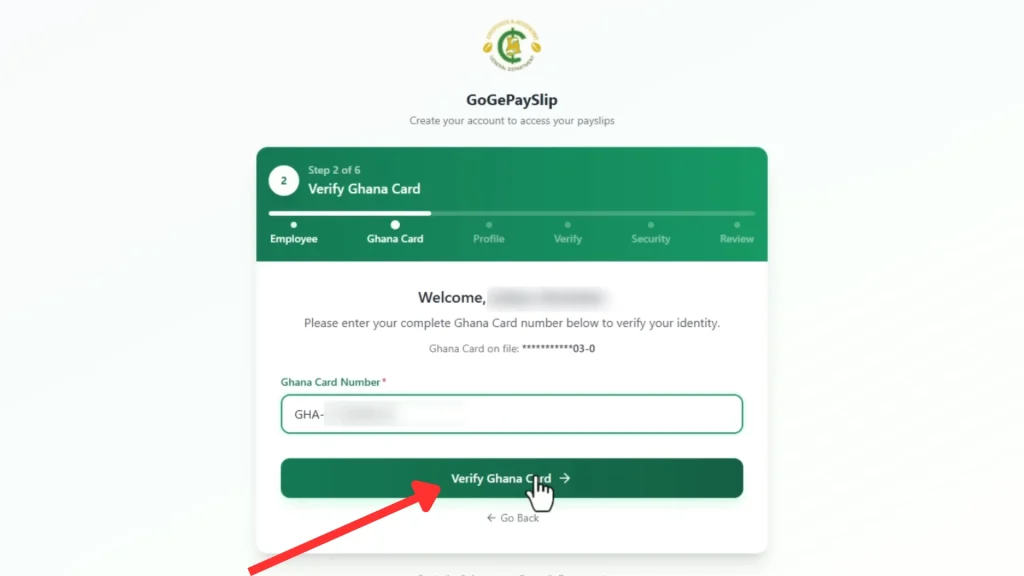
Now enter your Ghana Card (NIA) number carefully. Click Verify. If the details match CAGD records, your name and department will appear.
Step 5: Confirm Your Details
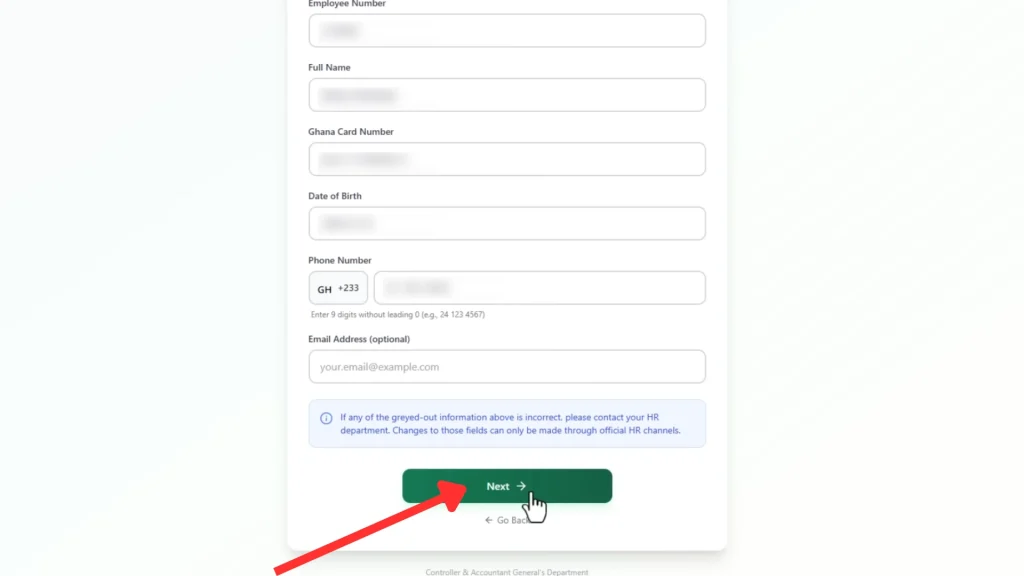
Check:
- Employee Number
- Full Name
- Ghana Card Number
- Date of Birth
If everything is correct:
- Enter your mobile number (compulsory)
- Enter email address (optional but recommended)
Click Next.
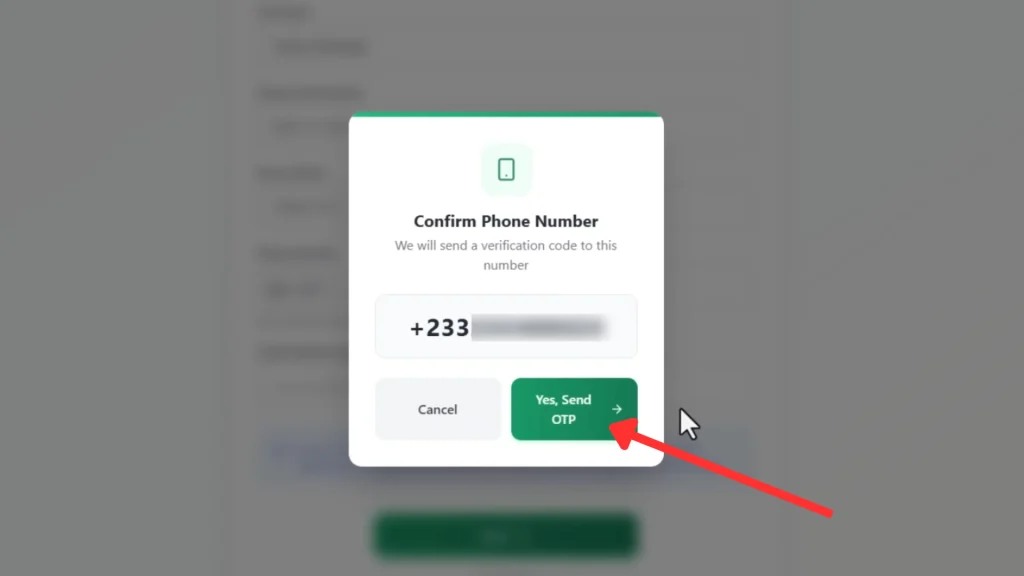
Step 6: Confirm Phone Number
Confirm your Phone Number and click on the “Yes, Send OTP” Button.
Step 7: OTP Verification (Important Step)
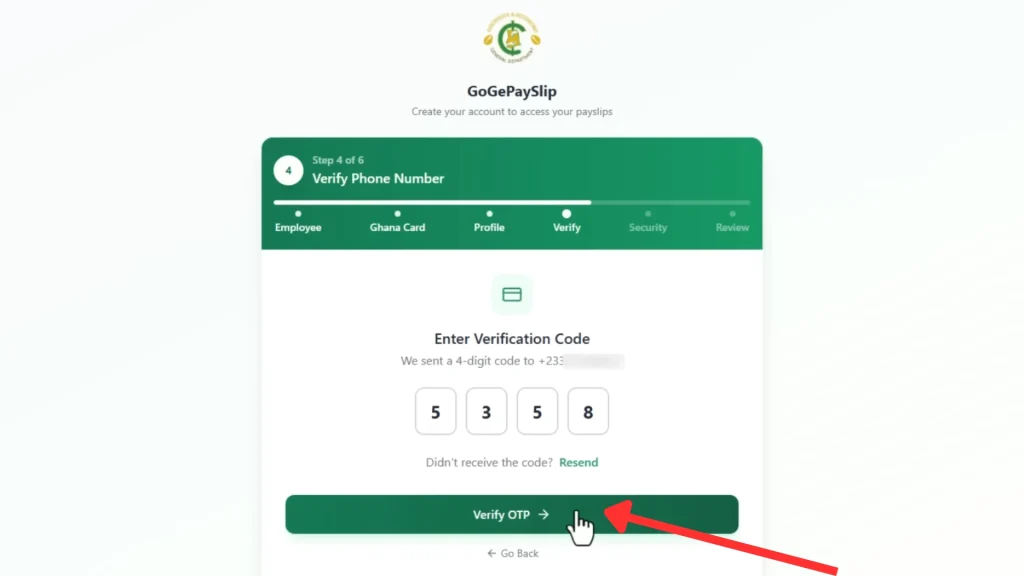
The system will send an OTP (One-Time Password) to your mobile number.
When you receive the code:
- Enter the OTP
- Click Verify
If OTP does not come, wait 2–3 minutes and try again. We will explain OTP problems in detail below.
Step 8: Create Your Password
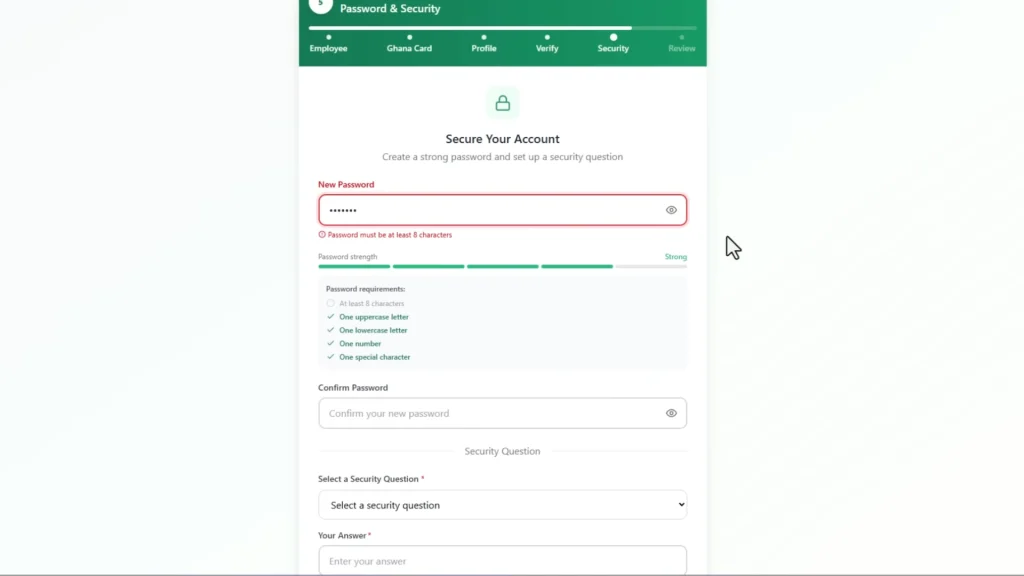
Create a strong password using:
- Letters
- Numbers
- Special symbols
Confirm your password.
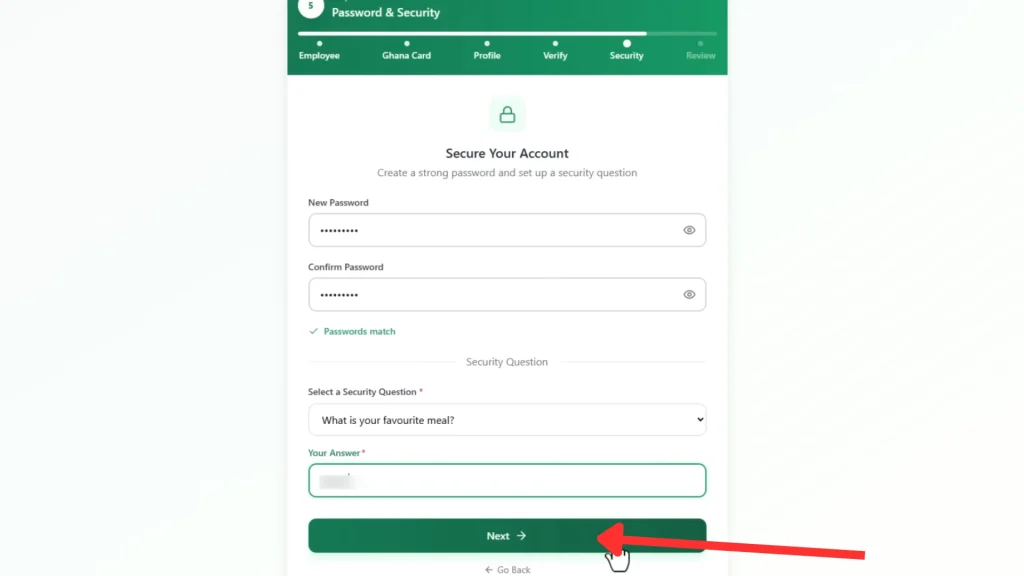
Step 9: Security Question and Answer
Choose a security question and answer. Click Register.
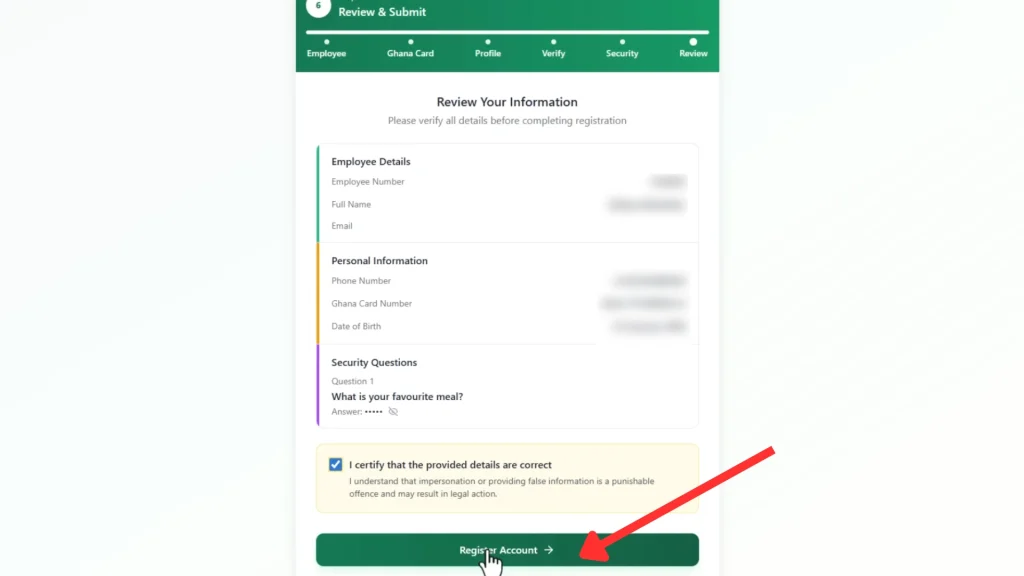
Step 10: Verify Information
Review all your information, if everything is right then click the “Register Account” button.
You have now successfully completed GoG ePay Services registration.
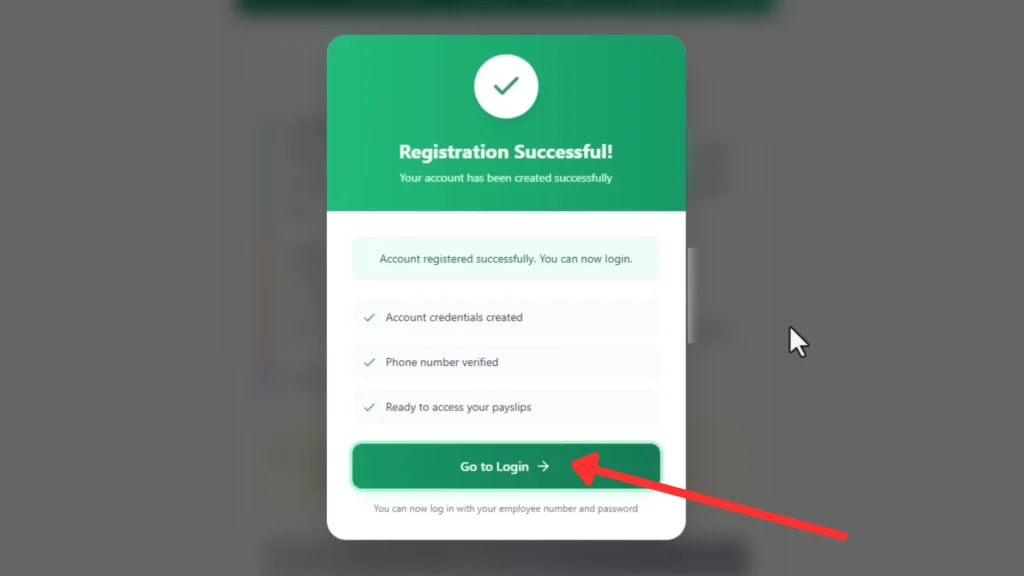
Step 11: Go to Login
A popup will appear showing successful registration. Now click the “Go to Login” button to login your account.
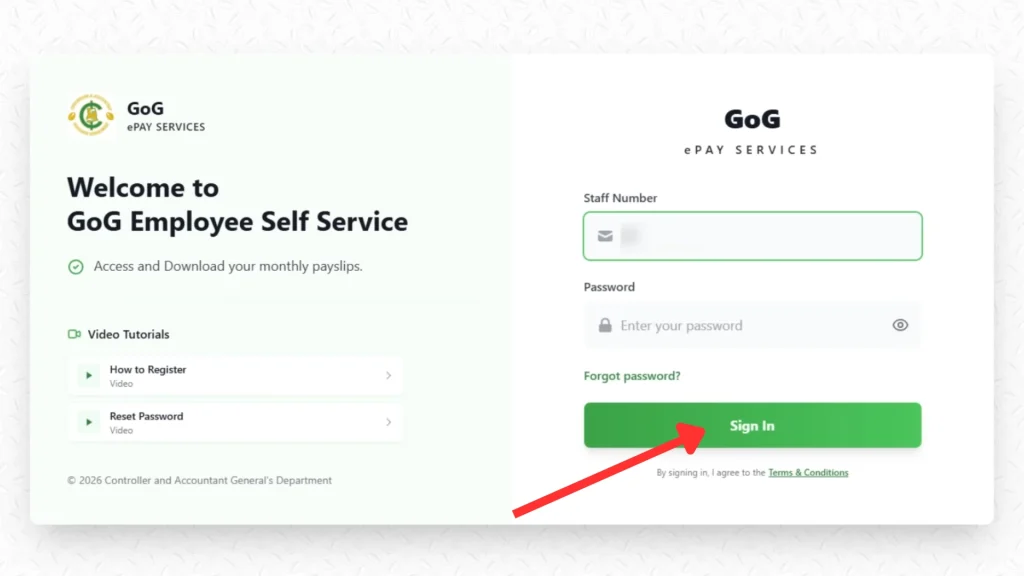
GoG ePay Services Login Process
After registration, follow these steps for GoG ePay Services login:
Open GoG ePay Services Portal by visiting the gogepayservices.com and enter the following details. Click the “Sign in” button.
- Enter Staff ID
- Enter Password
You will now access your dashboard. From there, you can download your payslip.
Why is OTP Not Coming on GOG ePay Services?
This is the biggest complaint about gogepayservices. Many users say: “OTP is not coming.”
Here are the real reasons and solutions:
1. High Traffic on Portal
Because the Ghana government payslip portal 2026 is new, many workers are registering at the same time.
Solution:
- Try early morning (5am–7am)
- Try late night
- Avoid month-end peak periods
2. Poor Network Signal
OTP requires a stable mobile network.
Solution:
- Wait and try again
- Move to open area
- Switch off and on your phone
3. Wrong Phone Number Entered
If you typed the wrong number during registration, OTP will not come.
Solution:
- Restart registration process
- Enter correct number
4. Network Delay
Sometimes SMS arrive after 5–10 minutes.
Solution:
- Wait before requesting another OTP
- Do not spam the “Resend OTP” button by clicking again and again at the same time.
5. SIM Card Issues
If your SIM is blocked or inactive, OTP cannot arrive.
Solution:
- Check if you can receive normal SMS
- Contact your network provider
If OTP still does not come, contact CAGD support.
6. CAGD Contact Numbers
If you are unable to login or receive OTP numbers, call on these numbers to resolve your issue.
Other Common Problems on CAGD Payslip 2026
1. Ghana Card Not Recognized
If your Ghana card is not accepted then make sure you are writing the correct Ghana card number in the correct format with no spaces.
If still fails, confirm your Ghana Card is linked to payroll.
2. Account Locked
If you try too many wrong login attempts then your account will be locked.
Solution: Do not try wrong attempts again and again, wait for 30 minutes and try again with correct information (login details).
3. Old Portal Not Working
Yes, the old site is replaced. Now you must use the new GOG payslip portal.
Difference Between Old Portal and New GOG ePay Services
| Feature | Old GOGPayslip | New GOG ePay Services |
| Website | gogpayslip.com | gogepayservices.com |
| Security | Basic | Ghana Card + OTP |
| Registration | Registration Code | Ghana Card Verification |
| Password Reset | Simple | OTP Secured |
| Interface | Older design | Improved 2026 system |
Important Tips for All Employees
- Never share your password
- Always use official website
- Do not give OTP to anyone
- Update your phone number if changed
Conclusion
The new GOG ePay Services (gogepayservices) is the official New GOG payslip portal introduced by CAGD to replace the old system. It is more secure and requires Ghana Card verification and OTP to protect the employee accounts.
All government workers must complete GoG ePay Services registration to access their payslips on the new portal. If you follow the correct steps for registration, login, and password reset, you will be able to use the Ghana government payslip portal 2026 without problems.
If you face issues like OTP not received, check your network, confirm your phone number, and try again later. The new CAGD payslip 2026 system is designed to make payslip access easier, faster, and safer for all Ghana government employees.