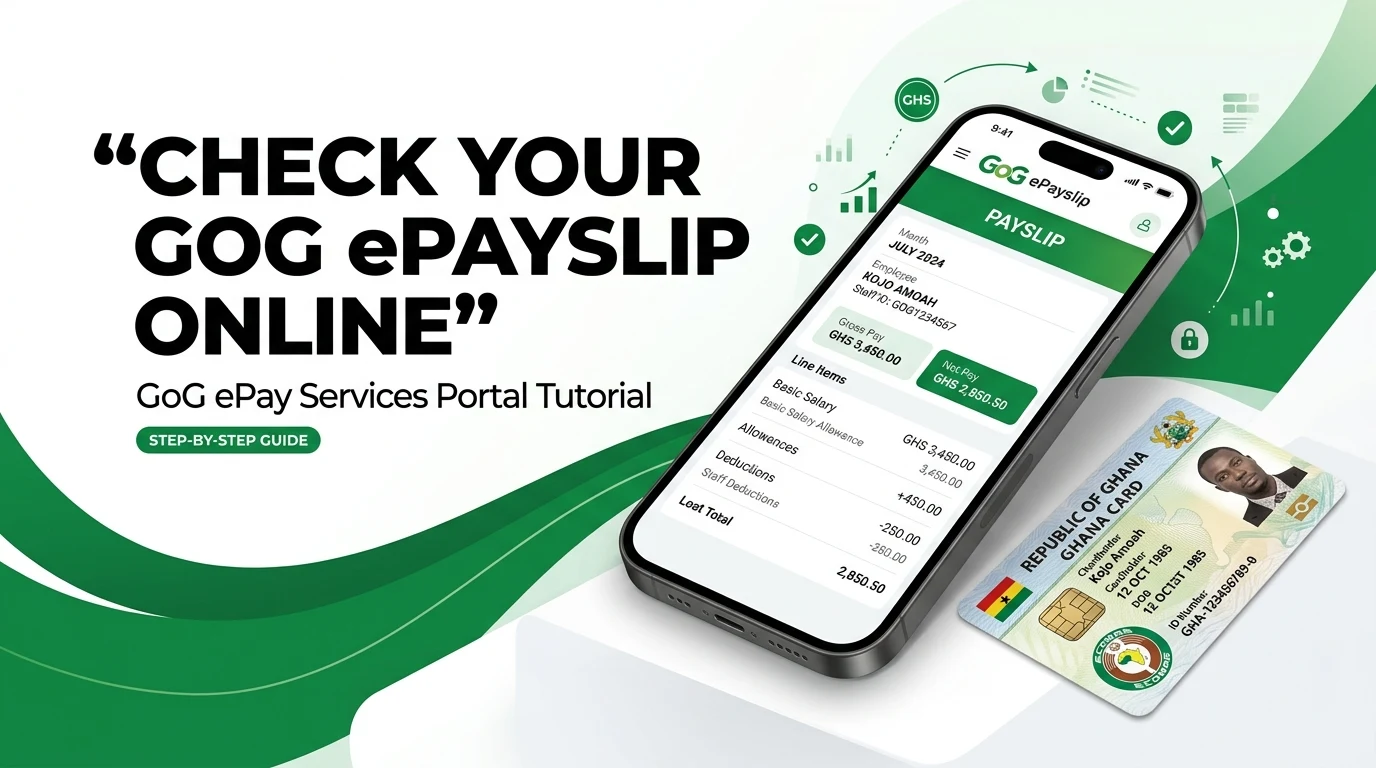
Can’t find your payslip after receiving your salary? It can be confusing and stressful, especially when you need your salary details urgently. Many government workers in Ghana face this problem and don’t know how to check their ePayslip online.
The GoG ePay Services Portal makes the process simple and fast. You can check, download, or print your payslip from your phone or computer without visiting any office. Here you will learn the step-by-step process to check your GoG ePayslip easily, even if you are using the portal for the first time.
What You Need to Check Your GoGPayslip Online
To use the GoG ePay Services portal, make sure you have the following:
Staff ID (Employee Number): Your official Staff number or work ID. Enter it exactly as given by your employer.
Password: Password of your gog epay services portal. Note: If you forget the password of your portal then Reset your password to check your epayslip.
Internet Device: A smartphone, tablet or computer with internet access and a modern browser (Chrome, Firefox, etc.). The portal is mobile-friendly, so you can use phones or desktops.
Steps to Check Your Payslip on GoG ePay Services Portal
Follow these simple steps to check and download your ePayslip from the GoG ePay Services Portal:
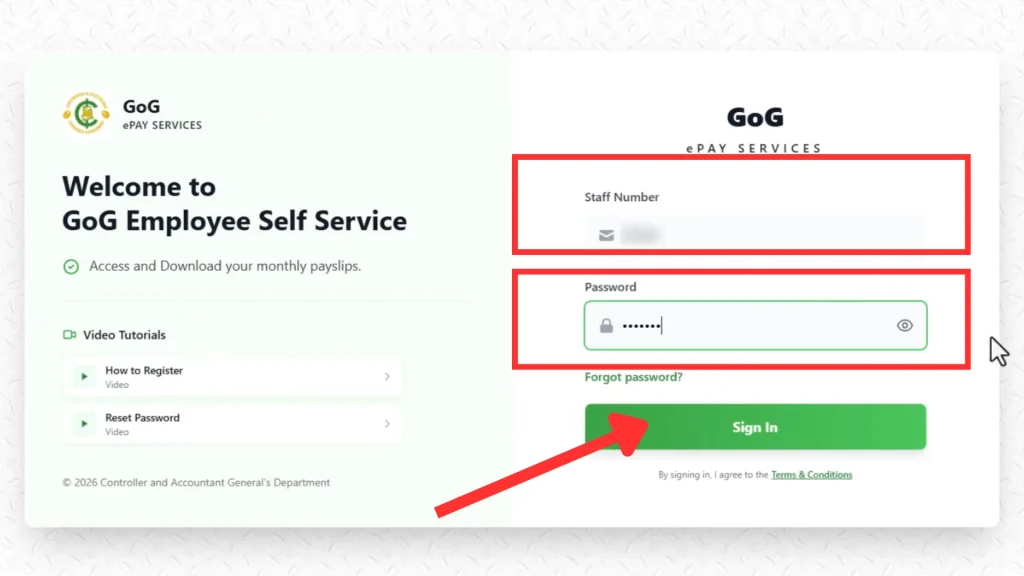
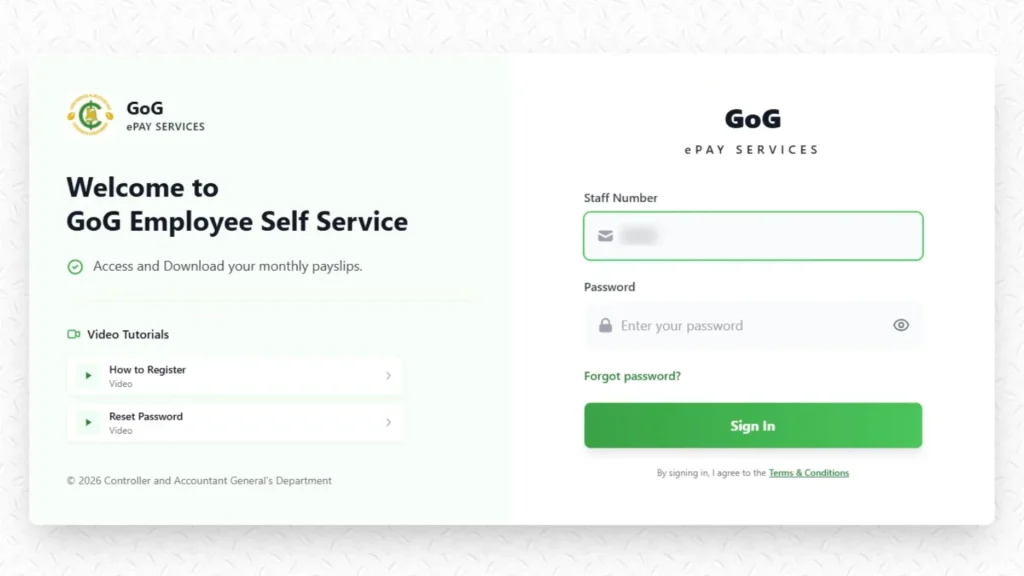
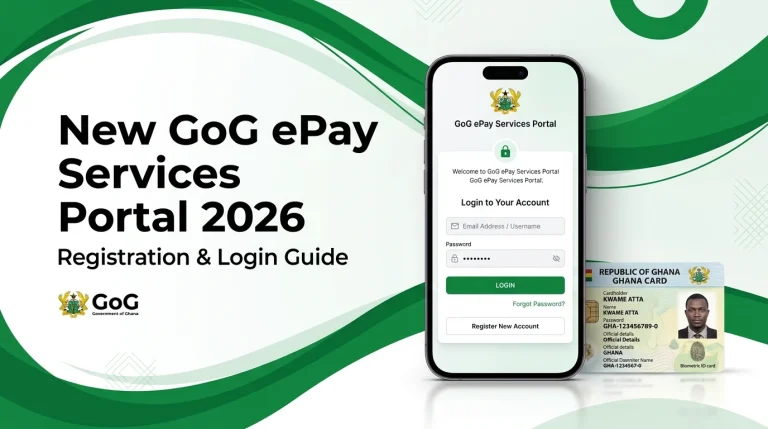
Step 1: Login to Your Account
Open the official gog epay services portal on your phone or computer
Enter your Staff ID and Password.
Click on the Sign in button.
Make sure to enter your details correctly to avoid login errors.
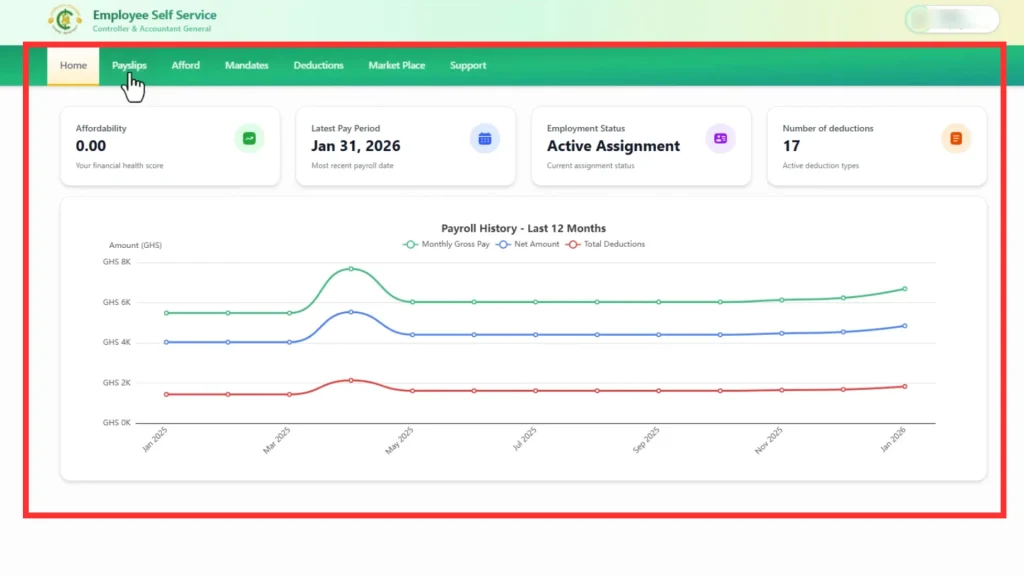
Step 2: Go to Your Dashboard
After login, you will see your Dashboard.
This is your main page where all options are available.
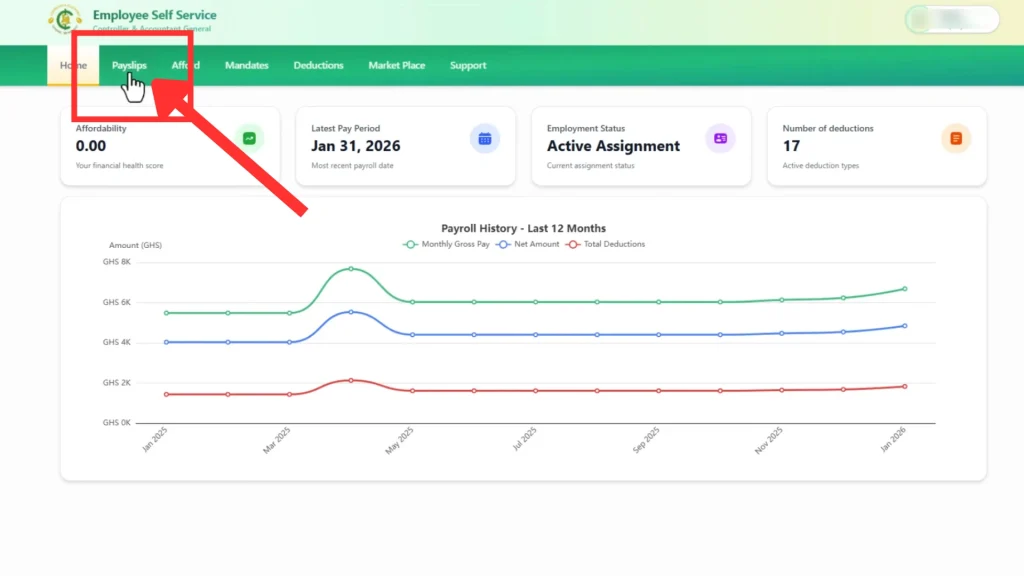
Step 3: Click on “Payslips”
On the dashboard, find and click the Payslips option.
This will take you to your payslip section.
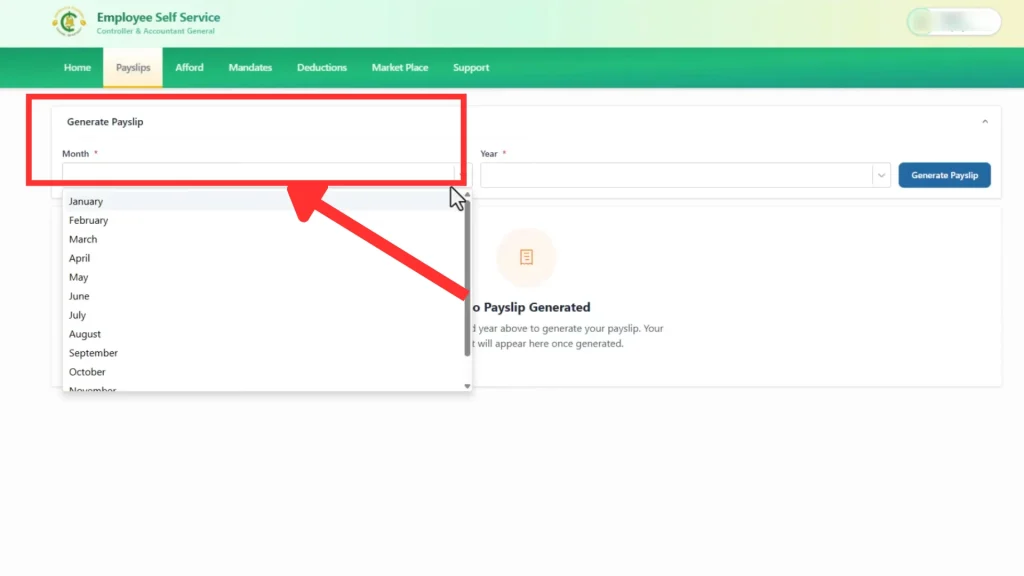
Step 4: Select Month
Choose the month for which you want to check your salary.
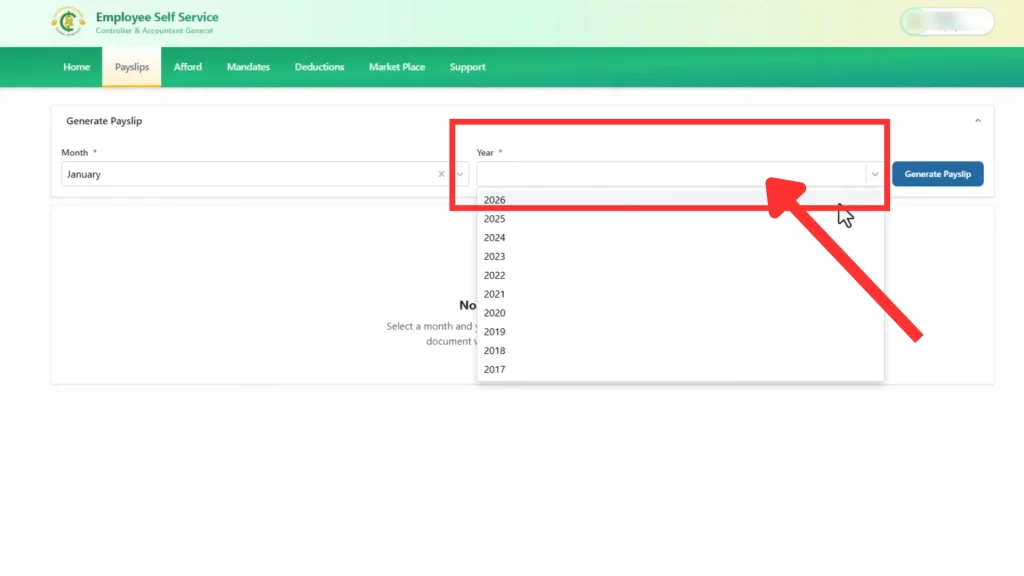
Step 5: Select Year
Now select the year (for example: 2026)
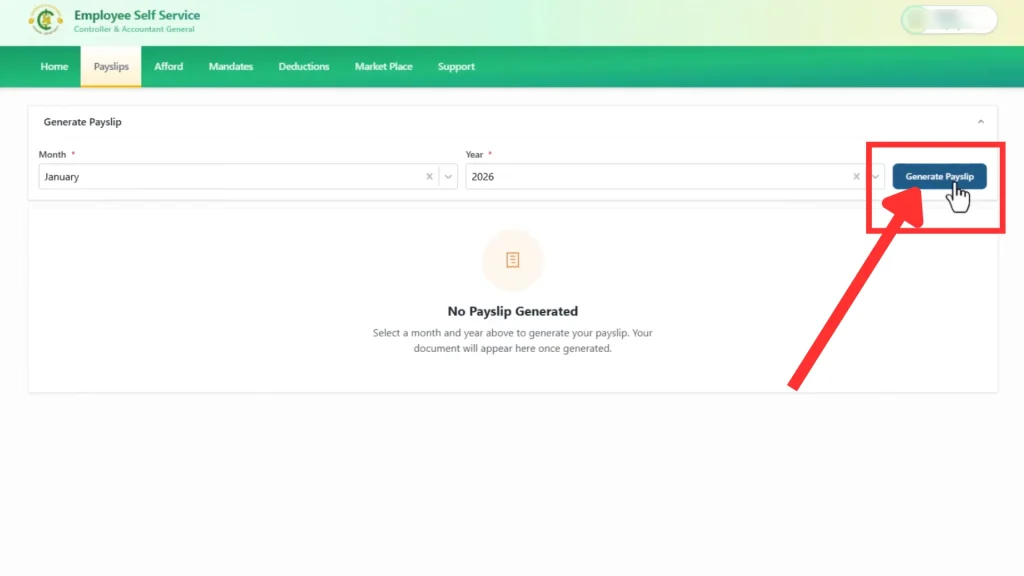
Step 6: Generate Your Payslip
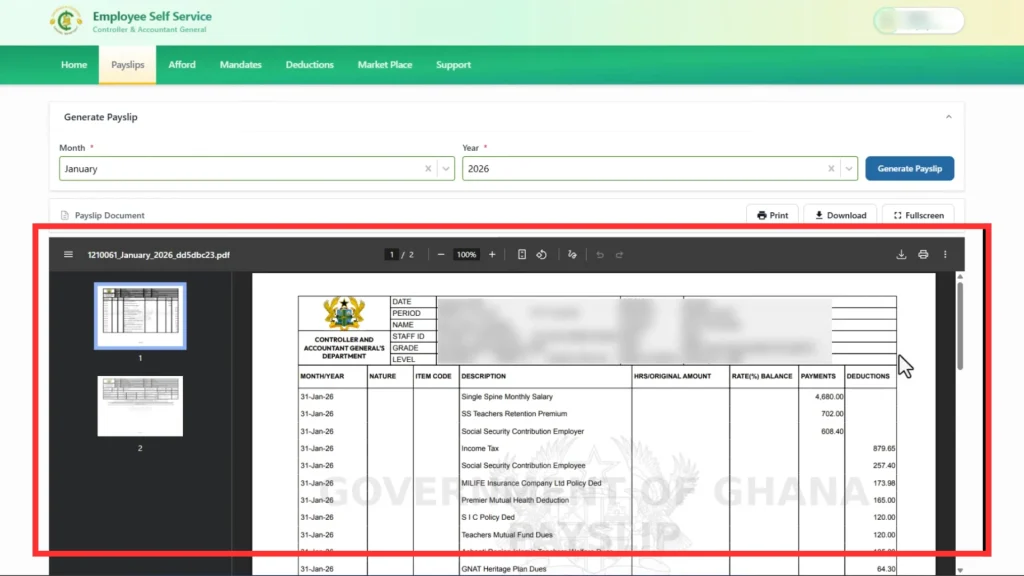
After selecting month and year, your payslip will open on the screen
Step 7: Check Your Details Carefully
Now review all important information:
Name
Basic Salary
Allowances
Deductions (tax, loans, etc.)
Net Salary (final amount you receive)
Always check for any mistakes in your details.
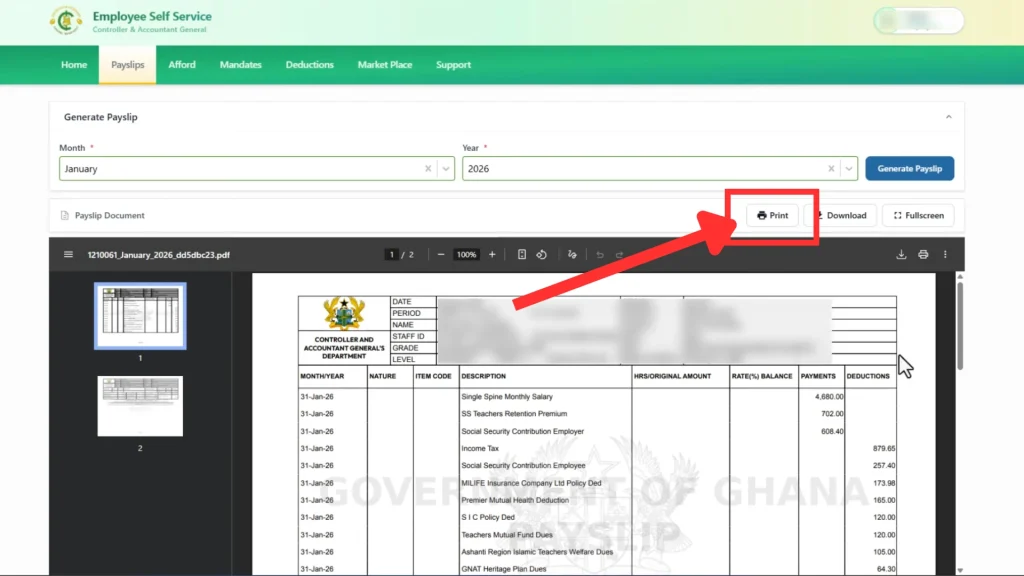
Step 8: Print Your Payslip
Click on the Print button.
Your payslip will be ready to print.
You can keep a hard copy for records.
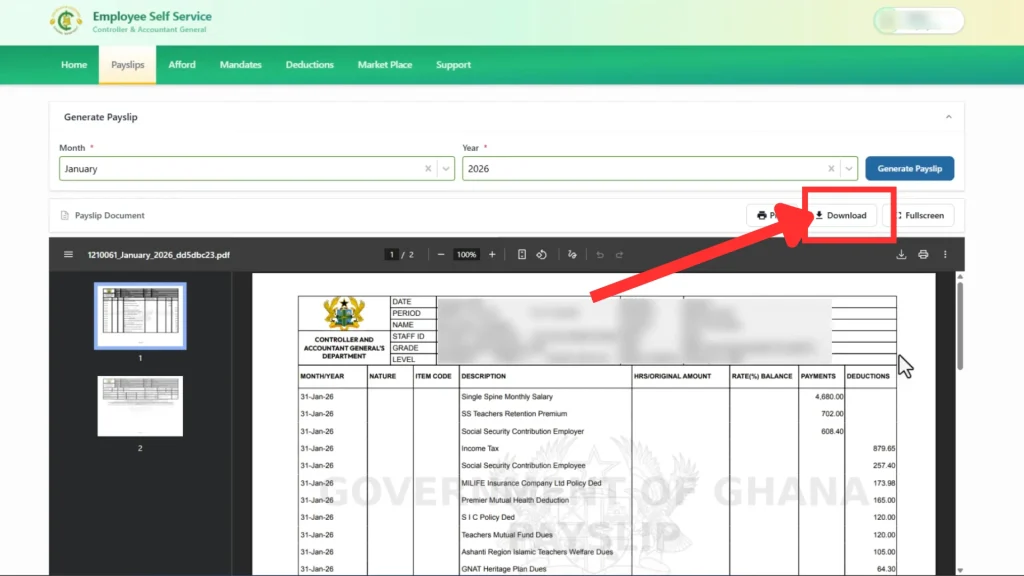
Step 9: Download PDF Version
Click on the Download button.
Your payslip will be saved as a PDF file on your device.
This is useful for sharing or future use.
Step 10: Logout from Your Account
After Printing or downloading the epayslip, click on the Logout button.
This keeps your account safe, especially on shared devices
What’s on the GoG EPayslip?
Your GoG e-payslip PDF contains important information, similar to a paper payslip:
Personal Info: Your name, Staff ID, department and pay grade.
Pay Details: This includes your gross salary (total before deductions) broken into basic pay and allowances (housing, transport, etc.).
Deductions: All amounts taken out of your pay through mandate number. This can include income tax, SSF (pension) contributions, NHIS, union dues, insurance, loan repayments, and any other statutory or voluntary deductions.
Net Pay: Your final pay (gross minus total deductions).
Employer Details: The payslip is issued by CAGD, so it usually shows “Controller & Accountant-General’s Department, Government of Ghana”.
All these amounts are computed by CAGD from payroll records. In short, salaries and deductions on the portal are official and come directly from CAGD’s system.
Features of GoG EPay Services Portal
The GoG ePay Services portal offers more than just payslips. Key features include:
Anytime Access: View payslips from anywhere with internet (even outside Ghana).
Download & Print: Save your payslip as a PDF and print it.
Security: Gog epay services portal uses Ghana Card verification and SMS OTP to secure your account. You also set a security question for extra protection.
Update Contacts: You can update your phone number or email in the portal.
EPayslip Checking Errors & Solutions
Error / Issue
Possible Cause
Solution (Fix)
OTP not received
Poor network or wrong phone number
Check mobile network, ensure correct number is linked, wait a few seconds, then click Resend OTP
Login failed
Wrong Staff ID or Password
Double-check both details and try again slowly
Account locked
Too many incorrect login attempts
Wait about 30 minutes, then try again with correct details
Payslip not loading
Slow internet or browser issue
Refresh the page, switch browser, or try again with a stable internet connection
Unable to download PDF
Browser or device issue
Enable downloads, try a different browser, or use another device
Payslip data incorrect
HR records not updated
Report the issue to your HR department (only they can fix salary data)
Portal not opening
Server downtime or connectivity issue
Check your internet, try again later, or access during non-peak hours
Forgot password
User cannot remember login details
Use “Forgot Password” option and answer the security question to reset
If you still can’t resolve an issue, contact the CAGD support team. Contact info is given at the end.
Pros and Cons of GoG EPayslips
Pros:
Fast and Convenient: No need to wait for printed payslips. You can get your payslip on the same day it’s posted on the Gog epayservices portal.
Always Available: Even if you travel or can’t get to work, you can download payslips from home.
Paperless and Green: EPayslip saves paper and office time. The Epayslip PDF is accepted by banks and agencies.
Secure: It’s more secure and safe than the old system.
Extra Features: Loan letters and tax and pension details are already included, so it is easier to manage your money.
Cons/Cautions:
Internet Needed: You need an online connection. In very remote areas, slow internet can be an issue.
Tech Hurdles: If you lose your Ghana Card or mobile, first you need to update it through HR. Also, too many login attempts with wrong credentials will temporarily lock the account.
Privacy: Always log out after use and don’t share your Staff ID and password. If someone else has your info, they can see your payslips.
Helpful Tips to check your EPayslip
Use the Official Site: Always use gogepayservices.com official gogepayservices portal. Do NOT trust links from random messages or emails.
Strong Password: Make your password a mix of letters, numbers or symbols. Don’t use common words.
Protect OTP: Do not share the OTP or security answer with anyone. It’s for your account only.
Update Contacts: If you change your phone number or email, update them in the portal immediately so you don’t miss OTPs or notifications.
Write Down Security Questions: Keep a secret note of your security question/answer, so you can remember it for password resets.
Clear Browser Cache: If the portal acts weird, try clearing your browser’s cache/cookies or use a different browser.
Video Guide: CAGD has a YouTube tutorial on how to use the gogepayservices portal.
Keep Records: Save every payslip PDF in a secure folder on your phone or computer for easy reference.
Contact & Support
If you need help, first talk to your department’s IT or HR office. They know your records and can assist with Ghana Card or Staff ID issues. For portal-specific problems, you can call CAGD support at
0247452601
0247811826
0505660003
0247360841
0246968301
They can guide you on registration, login, or portal errors.
Conclusion
Checking your salary details online is now easier with the GoG ePay Services Portal. Whether you want to view, download, or print your ePayslip, you can do everything from your phone or computer in just a few minutes. The portal helps government workers in Ghana access their salary information quickly without visiting any office.
If you face any issues like OTP problems, login errors, or missing payslips, most problems can be fixed by following the simple solutions shared in this guide. Make sure you keep your Ghana Card details and login information safe so you can access your payslip anytime you need it.
Frequently Asked Questions (FAQs)
It’s the Government of Ghana’s official online portal for public workers of Ghana to check, download, print their payslips, launched by the Controller & Accountant-General’s Department in 2026.
Yes. A valid Ghana Card number is compulsory for verification. You cannot complete registration without it.
Yes. Payslips from the GoG ePay Services portal are official government documents from CAGD. You can use them for bank loans, visa, etc.
Absolutely. The portal is mobile-friendly. You can login and check or download payslips on a mobile phone or tablet anytime.
No. The old GoG Payslip portal (gogpayslip.com) is not active now. All users must now use gogepayservices.com.
If the salary or deductions are incorrect, do not edit online. Instead, inform your HR or payroll office. They are responsible for fixing any payroll errors.
The system is managed by the Controller and Accountant-General’s Department (CAGD) of Ghana. They handle payroll and IT support for it.
Yes. It uses Ghana Card checks, SMS OTP, and security questions to protect your data. Just remember never to share your password or OTP with anyone.
Locked out of your payslip portal? Resetting your GOGPayslip Password is easier and faster than you think. If you’re a government worker in Ghana and can’t recall your login details, follow these steps to get access to your EPayslip account. We know for some people, it can be hard to remember passwords, so we made…
Government payroll processes can often feel confusing, especially when employees are asked to give third party institutions access to their salary details. Many Government of Ghana workers struggle to understand what a Mandate Number is, when it is required, and how to generate it correctly, which can lead to delays and repeated failed attempts. The…
The Government of Ghana has officially introduced the New GOG payslip portal in 2026. The new system is known as GOG ePay Services or gogepayservices, and it replaces the old GOGPayslip website that public servants were using before. If you are a government worker in Ghana, you must now use the New CAGD epayslip Portal…
Account registration on Ghana’s GoGPayslip portal is necessary for government employees to get easy and secure access to their EPayslips. The GoGPayslip system allows GOG Workers to check and download payslips, Ghana card, wrongful deductions, generate mandate forms, access to GRA and SSF reports and apply for a change of association. Registering an ePayslip account…
If you feel that your teacher union isn’t effectively representing your interests or solving your problems, now you want to join a new Association, and you don’t know how to start the procedure. Teacher Unions in Ghana represent the Government teachers of Ghana and protect their rights. You can change your Teacher union simply through…
The GoG EPayslip is an online system used by government workers in Ghana to check their salary details and perform other job-related tasks. This Portal is user-friendly, secure, efficient and easily accessible. Its modern and clean interface allows GOG Employees to navigate their Payslips, My Ghana card, Change of Association Form, Wrongful Deductions and many…